Activate a Test Store
Limited access
Marketplace APIs are not yet generally available. Prospective partners can apply for API access directly through the DoorDash Developer Portal.
New to the Developer Portal? Sign up here to create an account and apply for access.
Already have a Developer Portal account? Log in and submit your application from the Integrations tab.
After you push or pull the first menu for a test store, you can now activate that store directly from the Developer Portal. This enables you to place test orders.
To activate a test store:
- Go to the Developer Portal.
- In the left navigation, click Stores.
- Find your test store in the list.
- Open the three-dot menu next to the store.
- Click Activate store.
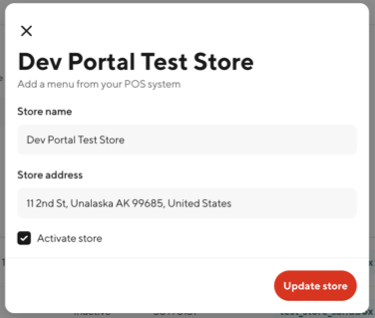
The store status will change to Active, and it will be available for use with menu testing and order simulation.
Note: Only stores with at least one menu ingested or pulled are eligible for activation.
Was this page helpful?