Notifications Hub
Stay on top of your integration health and platform updates — right from your Developer Portal.
Overview
Notifications Hub is a feature in your Developer Portal that surfaces direct, actionable messages from the DoorDash integrations team — right where you're already working. It's supplementary to our monthly OpenAPI release notes email, which you'll continue to receive — Notifications Hub is a more real-time place for targeted alerts about integration errors affecting your order quality, updates on new features and documentation, and other calls-to-action as they come up. Each notification includes a short explanation and a call-to-action link that takes you straight to the relevant data or resource, so you can act on it immediately.
Where to Find Your Notifications
Look for the bell icon in the top navigation bar of your Developer Portal. A red badge appears on the bell whenever you have unread notifications — showing a dot for a single unread message, or a number when you have multiple.

Click the bell to open the Other updates panel, which lists your active notifications with a title, description, and the date it was sent.
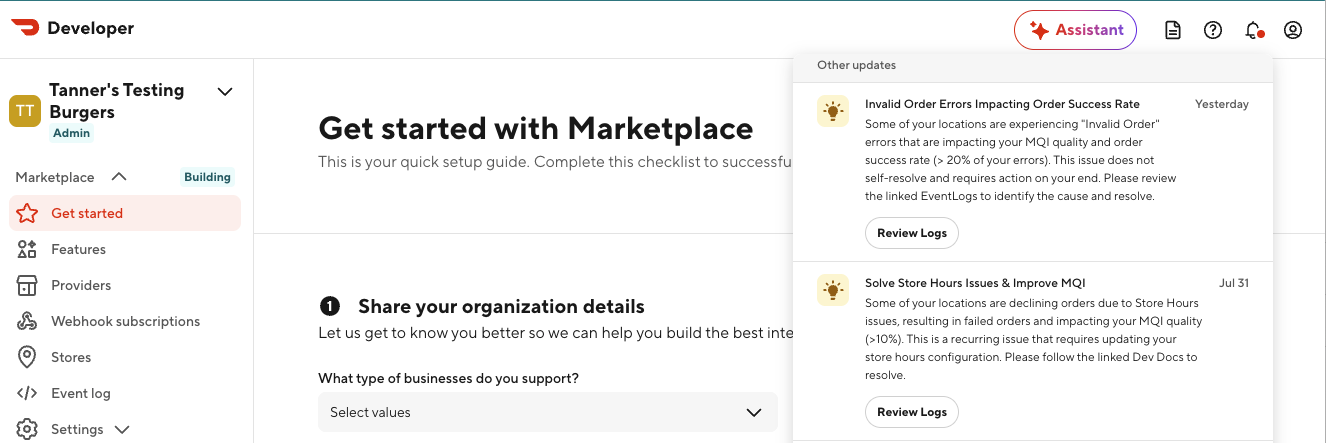
Each notification includes a button — such as Review Logs — that links directly to the filtered view, report, or doc referenced in the message.
What to Expect
- Notifications stay visible for 30 days from when they're sent, even after you've read them.
- The unread indicator on the bell icon clears once you click the notification's call-to-action button.
- Notifications are scoped to your organization — you'll only see messages relevant to your stores and integration.
Types of Notifications You Might Receive
| Type | What it means |
|---|---|
| Integration quality alerts | One of your top error types is impacting order success rate or MQI compliance. |
| Feedback surveys | Short surveys to collect your insights and feedback as a valued partner. |
| New features & dev docs updates | A new feature, tool, or documentation page is available. |
| Platform announcements | General product updates, GTM announcements, or process changes. |
FAQ
Q: How often will I receive notifications? A: Cadence depends on the type of notification. Integration quality alerts are typically sent once when an issue is first detected, with a follow-up reminder if it hasn't been resolved a couple weeks later. Feature and platform announcements are sent as one-time updates.
Q: Do I need to do anything to start receiving notifications? A: No setup is required. Notifications Hub is available by default in your Developer Portal.
Q: Who can I contact if I have questions about a notification? A: Reach out to Support through your Developer Portal — they can provide more context on any message you receive.
Next Steps
Check your Developer Portal regularly for new notifications, and use the linked call-to-action on each message to resolve flagged issues quickly. If you have questions about a specific notification, reach out to Support through your Developer Portal.