Support catering orders
Integrate scheduled orders, catering menus, and catering order reporting
Overview
Catering integration lets DoorDash send catering orders to your point-of-sale (POS) or middleware platform with the context store operators need to prepare them successfully. Catering orders differ from standard orders in three important ways: they are always scheduled for a future time or date, customers order from dedicated catering menus with distinct items and pricing, and merchants need to identify and reconcile them separately from their day-to-day delivery business.
This guide describes the three capabilities a partner must support to handle catering orders end to end:
- Scheduled order handling — receive orders ahead of time, surface the DoorDash-provided pickup time, and give operators a place to manage upcoming orders.
- Catering menu management — let merchants share one or more dedicated catering menus, tagged with a catering experience.
- Catering order management & reporting — ingest the order
experiencefield and surface it everywhere orders appear, including financial reconciliation reporting.
Catering is one of the highest-value order types on the platform — larger baskets, planned in advance, and often tied to recurring business customers. Merchants will not run catering on DoorDash unless their integrated POS can receive these orders reliably, prepare them on time, and account for them cleanly. Supporting catering makes your platform eligible for DoorDash's catering programs and unlocks a new, high-margin order stream for your shared merchants.
Benefits
For merchants:
- Receive catering orders directly in the POS with enough lead time to plan prep and staffing.
- Manage separate catering menus with their own items and pricing, without affecting the standard menu.
- Clean financial reconciliation — catering orders are clearly labeled and reportable as their own order type.
For customers:
- Reliable, on-time catering for planned events, prepared from an accurate catering menu.
For partners:
- Eligibility for DoorDash catering programs (Marketplace Catering, Online Ordering Catering, and Meal Manager).
- A differentiated integration offering you can market to your merchant base.
Tip: Meal Manager is DoorDash's recurring corporate group-ordering solution, designed for teams that provide meals on a regular schedule. Group orders are scheduled and sent to merchants in the morning for delivery later that day, and fire into the merchant's POS using their standard marketplace menu. Meal Manager needs its own order experience tag, separate from 3P and 1P catering.
Before You Begin
This guide is for POS providers and middleware partners integrated with DoorDash's Menu and Orders APIs who want to enable catering for their merchants.
Feature requirements
The requirements below represent the table-stakes set: the non-negotiable capabilities needed to place and fulfill any catering order. Best-in-class enhancements are called out separately and highly recommended, although not required.
1. Scheduled order handling
Merchant need: "I need visibility into catering orders ahead of time, and I want to prepare them for the right pickup time."
Catering orders are typically scheduled rather than ASAP. Your integration must identify a scheduled order, display the correct pickup time, and give operators a place to see upcoming orders.
Requirements
- Identify scheduled orders. Use the
is_scheduledfield on the order payload to determine that a catering order is scheduled for a future time rather than ASAP, and surface that distinction to the merchant. - Display the DoorDash pickup time. Use the
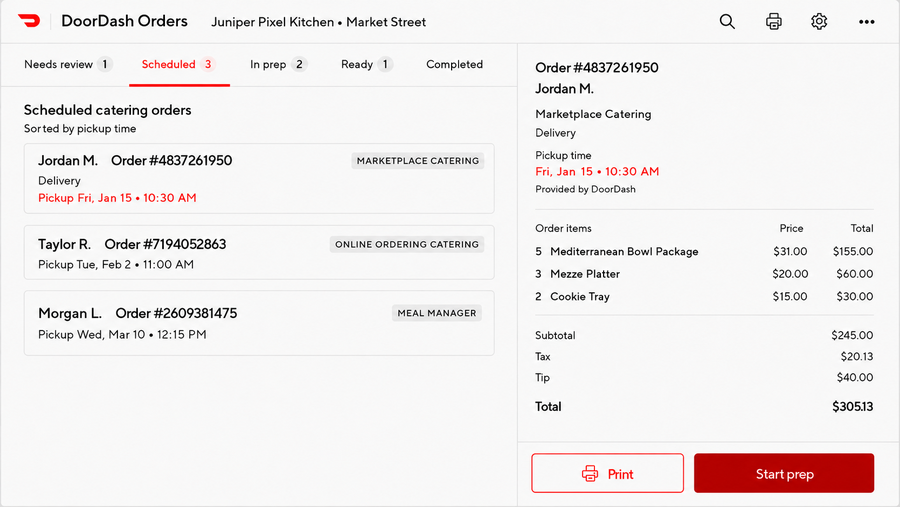
estimated_pickup_timefield DoorDash sends to display the pickup time to the merchant. Show the value DoorDash transmits; do not populate it with a time you calculate yourself. - Provide a scheduled-order view. Hold scheduled orders transmitted by DoorDash in a dedicated scheduled-order tab or queue so operators can see and manage upcoming orders (front-end / UI requirement).
Recommended operator experience
A good scheduled-order experience keeps upcoming catering orders visible without cluttering the live order queue.
- A catering order arrives and is recognized as scheduled, using the
is_scheduledfield on the order payload. - The order is routed to a Scheduled Orders tab rather than the active/ASAP queue, labeled clearly as "Scheduled."
- The tab displays the DoorDash-provided pickup time for each order and sorts by earliest pickup.
- Ahead of the pickup time, the order surfaces to operators for preparation; the pickup time shown always matches the DoorDash value.
2. Catering menu management
Merchant need: "I want to use different menus with distinct settings for my catering orders."
Catering menus carry different items, portion sizes, and pricing than a merchant's standard menu, so they must be represented as separate menus rather than variations of an existing one.
Requirements
- Support multiple active menus. Allow merchants to share more than one active menu with DoorDash.
- Support net-new catering menus. Merchants must be able to create a standalone catering menu that is passed separately from the menu used for the standard DoorDash Marketplace.
- Tag the menu as catering. Support the
cateringexperience on the menu so DoorDash knows the menu is a catering menu. By default, a menu taggedcateringis used for both Marketplace and Online Ordering (Storefront) catering, if the merchant also supports first party catering on DoorDash. - [Optional] Support
online_ordering_catering. For merchants who choose to configure a separate Online Ordering (first party/Storefront) catering menu. When configured, theonline_ordering_cateringmenu shows on the merchant's first party channel instead of the generic catering menu; when not configured, the generic catering menu shows everywhere.
Channel-based menu experiences
| Menu experience | Behavior |
|---|---|
catering | Default catering menu shown on both Marketplace and Online Ordering (Storefront) catering channels. |
online_ordering_catering | Separate first party catering menu. If configured, shows on the Online Ordering channel instead of the generic catering menu. If not configured, the catering menu shows everywhere. |
Tip — Dual pricing: Dual pricing (separate pickup and delivery prices) is not supported for catering menus. We recommend that integration partners do not pass both
priceandbase_priceon catering menus. If both values are passed,pricewill be ignored and onlybase_pricewill be displayed on the customer-facing menu.
3. Catering order management & reporting
Merchant need: "I want to clearly identify orders that come from catering programs."
The single most important outcome here is accurate financial reporting; merchants need catering orders broken out as their own order type for reconciliation.
Requirements
- Ingest the order experience field. DoorDash transmits an
experiencefield on the order indicating which catering program the order came from. Partners must ingest this field. - Surface it everywhere the order appears. The experience must be visible in order views and included in all reporting, including financial reconciliation reporting.
- Align order experience values with the menu type. The
experiencefield values align with the catering menu experiences (plus Meal Manager).
Order experience values
| Experience value | Meaning |
|---|---|
marketplace_catering | Catering order placed through the DoorDash Marketplace catering experience. |
online_ordering_catering | Catering order placed through a first party (Storefront / Online Ordering) catering channel. |
meal_manager | Catering order placed through DoorDash Meal Manager. |
Middleware providers
Middleware providers are held to the same standard as POS providers for catering. A middleware provider must ingest the catering signals and pass them downstream to the point of sale. If the middleware does not act on a field (for example the scheduled-order signal or the experience field), that field will not reach the downstream POS and the catering experience breaks. Middleware providers must ensure scheduled-order handling, catering menus, and the experience field flow through to the POS they serve.
Field details
The tables below summarize the fields relevant to catering across the Orders and Menu APIs.
Order payload — scheduled order fields
| Field | Description | Partner requirement |
|---|---|---|
is_scheduled | Indicates the order is scheduled for a future time rather than ASAP. Exists on the order today. | Identify the order as scheduled and label it as such to the merchant. |
estimated_pickup_time | The pickup time DoorDash provides for the order (ISO 8601 timestamp). | Display this exact value to the merchant. Do not calculate or override it. |
is_pickup | Whether the order is a pickup order (existing field). | Existing behavior; unchanged. |
Order payload — catering identification fields
| Field | Description | Partner requirement |
|---|---|---|
experience | Catering program the order came from: marketplace_catering, online_ordering_catering, or meal_manager. | Ingest and surface in order views and all reporting, including financial reconciliation. |
Menu payload — catering menu fields
| Field | Description | Partner requirement |
|---|---|---|
catering (menu experience) | Tags a menu as a catering menu. Shown on both Marketplace and Online Ordering catering by default. | Required. Support tagging a net-new, fully separate menu as catering. |
online_ordering_catering (menu experience) | Optional, separate first party catering menu. Overrides the generic catering menu on the first party/Online Ordering channel when configured. | Optional |
Example payloads
The examples below are illustrative and show only the catering-relevant fields on an otherwise standard order payload.
Scheduled Marketplace catering order
{
  "id": "1522756512",
  "delivery_uuid": "69668578-b72d-4805-9327-4c5e64b1e75c",
  "store_order_cart_id": "4332079335",
  "is_pickup": false,
  "is_asap": false,
  "is_scheduled": true,
  "estimated_pickup_time": "2027-01-15T18:30:00.000000+00:00",
  "experience": "marketplace_catering",
  "subtotal": 24500,
  "tax": 2013,
  "tip_amount": 4000,
  "currency_code": "USD",
  "categories": [ ... ]
}
Scheduled 1P (Storefront) catering order
{
  "id": "1825578540",
  "delivery_uuid": "d810eed5-ecb1-417c-80dd-96f0c9f9c809",
  "store_order_cart_id": "4648815252",
  "is_pickup": true,
  "is_asap": false,
  "is_scheduled": true,
  "estimated_pickup_time": "2027-02-02T11:00:00.000000+00:00",
  "experience": "online_ordering_catering",
  "subtotal": 18000,
  "tax": 1485,
  "currency_code": "USD",
  "categories": [ ... ]
}
Meal Manager catering order
{
  "id": "1900045512",
  "delivery_uuid": "aa1b90e2-13cd-4c77-9f01-77b2c0d51e44",
  "store_order_cart_id": "5120993310",
  "is_pickup": false,
  "is_asap": false,
  "is_scheduled": true,
  "estimated_pickup_time": "2027-03-10T12:15:00.000000+00:00",
  "experience": "meal_manager",
  "subtotal": 52000,
  "tax": 4290,
  "currency_code": "USD",
  "categories": [ ... ]
}
Testing and certification
DoorDash will coordinate with you to validate your catering implementation before certification. To demonstrate a successful implementation, partners should be able to:
- Receive and correctly identify a scheduled catering order, and display the DoorDash-provided
estimated_pickup_time(not a calculated value). - Surface scheduled catering orders in a dedicated scheduled-order view.
- Ingest a net-new catering menu as a separate payload with its own items and pricing, tagged with the catering experience.
- Ingest the order
experiencefield and surface it in order views and reporting, including financial reconciliation output.
How to certify
- Submit a support ticket via the DoorDash Developer Portal indicating you are ready to certify catering.
- DoorDash configures test catering menus and places test catering orders (scheduled, across the relevant experiences).
- Provide screenshots of your UI showing the scheduled-order view and pickup time, and reporting output showing the catering experience for reconciliation.
- DoorDash validates the results and confirms certification or shares required updates.
Details to include in the support ticket:
- Test Business ID and Test Store ID.
- Which catering experiences you are certifying (Marketplace Catering, Online Ordering Catering, Meal Manager).
- Whether you are certifying the optional
online_ordering_cateringseparate menu.
FAQ
Q: How do I know what pickup time to show the merchant?
A: Always display the estimated_pickup_time DoorDash sends on the order. Do not calculate or override it with your own estimate.
Q: Can a merchant use the same menu for catering and standard orders? A: No. Catering menus must be separate menu payloads with their own items and pricing. Do not represent catering by inflating prices on a standard menu.
Q: Do I have to support separate 1P and 3P catering menus?
A: Supporting the catering experience (shown on both Marketplace and Online Ordering) is required. The separate online_ordering_catering menu is an optional enhancement.
Q: Why does the experience field matter so much?
A: Merchants need catering orders broken out as their own order type for financial reconciliation. Ingesting and surfacing the experience field in reporting is the primary requirement of order management.
Q: Is is_scheduled a new field?
A: No — the scheduled-order signal already exists on the order today.