Implement Pizza Menus
Enable the DoorDash pizza builder experience for your menu
Overview
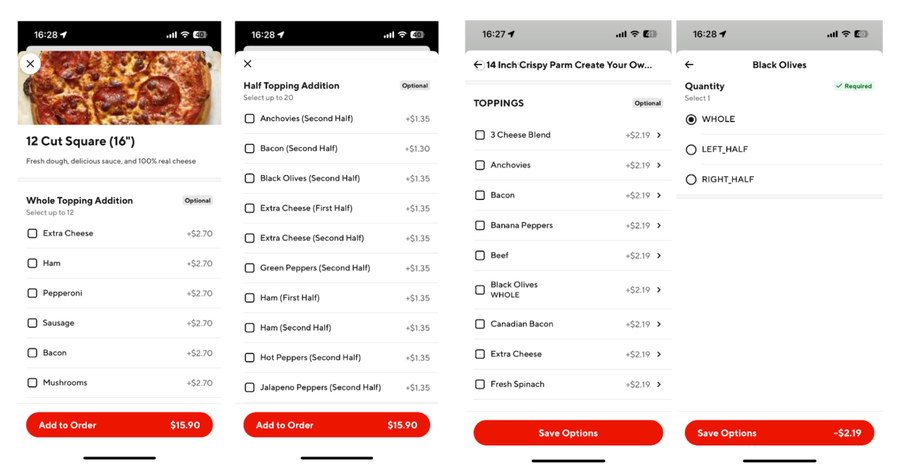
DoorDash's Menu and order APIs support a set of pizza-specific fields that unlock the native pizza builder UI — the same customizable size, crust, and half/half topping experience available on merchants' 1P apps.
Standard DoorDash menus don't support deep personalization, which makes it hard for customers to configure precise pizza orders — especially half/half toppings or extra toppings. By adding a few new display-type fields to your existing menu payload, you can unlock a purpose-built pizza customization experience for your customers.
Before You Begin
- Your menu must already support item and modifier images, since the pizza builder relies on rendering topping images.
- Familiarize yourself with the standard Menu API
extrasandoptionsstructure — pizza menus use the same structure with additional display-type fields layered on top.
How It Works
DoorDash has extended the Menu API contract with two new fields that tell DoorDash how to render a highly customized, pizza-specific experience. Add these fields at the extras (option group) and options (individual option) level of your existing menu payload.
selection_mode_display_type
Set on an extras (option group) object. Dictates the visual layout used to present that group of options to the customer.
| Value | Description |
|---|---|
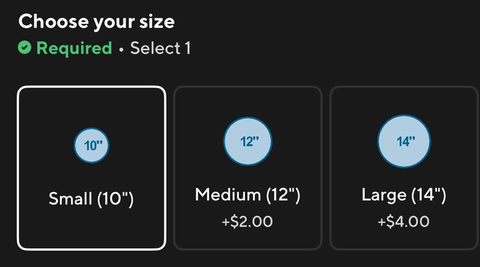
card | Renders the options as a series of cards. Use this for the pizza size selection (e.g., Small, Medium, Large). |
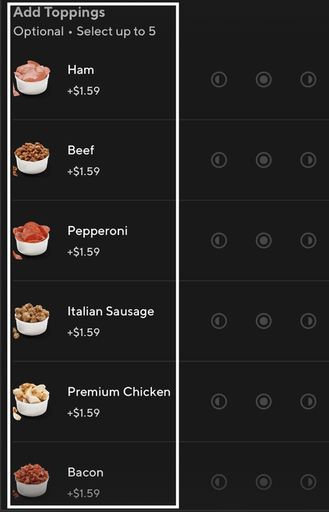
visual_container | Renders the options as a list where each option is represented visually (e.g., by an image). Use this for presenting available toppings. |
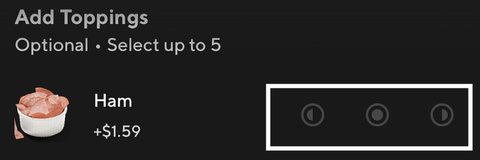
circular_sector | Renders options as portions of a circle. Use this for topping side selection (e.g., "Left Half," "Whole," "Right Half"). |
original_image_display_type
Set on an options object, typically for a topping. Specifies how that option's image should be visually rendered on the pizza.
| Value | Description |
|---|---|
whole_circle | Renders the image across the entire circular area — the topping applies to the whole pizza. |
left_half_circle | Renders the image on the left half of the circular area — the topping applies to the left half of the pizza. |
right_half_circle | Renders the image on the right half of the circular area — the topping applies to the right half of the pizza. |
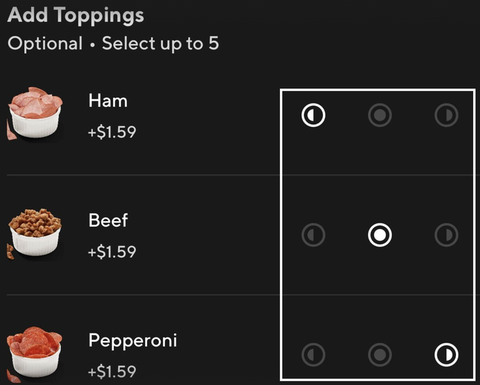
Recommended Menu Structure
Nest your pizza item's extras in the following order so the builder renders correctly:
- Size —
selection_mode_display_type: card - Crust — nested under each size option
- Cheese, Toppings, and Modifiers — nested under crust, using
visual_containerfor the topping list andcircular_sectorfor each topping's side selector
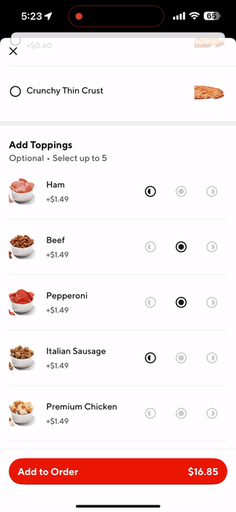
Example Menu Payload
{
  "store": {
    "id": "123456778",
    "merchant_supplied_id": "1114",
    "provider_type": "doordash_us_production"
  },
  "menu": {
    "name": "PizzaMenu",
    "subtitle": "Menu",
    "sourceOfCreation": "pos",
    "active": true,
    "business_id": 12345,
    "merchant_supplied_id": "agg-svc-menu",
    "image_process_mode": "imageAutoLinkingAndApproval",
    "categories": [
      {
        "name": "Build Your Own Pizza - NEW CRUST",
        "subtitle": "",
        "sort_id": 0,
        "active": true,
        "merchant_supplied_id": "BuildYourOwn",
        "items": [
          {
            "name": "Build Your Own Pizza - NEW CRUST",
            "description": "A custom pizza made to order. Choose from any of our delicious crust styles, including Handmade Pan, New York Style, and NEW Parmesan Stuffed Crust.",
            "price": 1049,
            "base_price": 1049,
            "merchant_supplied_id": "S_PIZZA",
            "active": true,
            "sort_id": 0,
            "original_image_url": "https://cache.doordash.com/aggregator-product-images/US/doordash/S_PIZZA.png",
            "extras": [
              {
                "name": "Choose your size",
                "max_num_options": 1,
                "min_num_options": 1,
                "merchant_supplied_id": "SIZES_S_PIZZA",
                "selection_mode_display_type": "card",
                "options": [
                  {
                    "name": "Small (10\")",
                    "active": true,
                    "description": "",
                    "price": 0,
                    "base_price": 0,
                    "merchant_supplied_id": "S_PIZZA_10",
                    "default": true,
                    "sort_id": 0,
                    "extras": [
                      {
                        "name": "Choose your crust",
                        "max_num_options": 1,
                        "min_num_options": 1,
                        "merchant_supplied_id": "FLAVORS_S_PIZZA_10",
                        "options": [
                          {
                            "name": "Hand Tossed",
                            "active": true,
                            "price": 0,
                            "base_price": 0,
                            "merchant_supplied_id": "HANDTOSS",
                            "default": true,
                            "sort_id": 0,
                            "extras": [
                              {
                                "name": "Add Toppings",
                                "max_num_options": 5,
                                "min_num_options": 0,
                                "sort_id": 0,
                                "merchant_supplied_id": "MODIFY_TOPPINGS_S_PIZZA",
                                "selection_mode_display_type": "visual_container",
                                "options": [
                                  {
                                    "name": "Ham",
                                    "active": true,
                                    "price": 149,
                                    "base_price": 150,
                                    "merchant_supplied_id": "S_PIZZA_H",
                                    "sort_id": 3,
                                    "original_image_url": "https://cache.doordash.com/aggregator-product-images/US/doordash/S_PIZZA_H.png",
                                    "extras": [
                                      {
                                        "name": "Topping Side",
                                        "active": true,
                                        "max_num_options": 1,
                                        "min_num_options": 1,
                                        "merchant_supplied_id": "TOPPING_SIDE",
                                        "selection_mode_display_type": "circular_sector",
                                        "options": [
                                          {
                                            "name": "Left Half",
                                            "active": true,
                                            "price": 0,
                                            "base_price": 0,
                                            "merchant_supplied_id": "LEFT_HALF",
                                            "sort_id": 0,
                                            "original_image_display_type": "left_half_circle"
                                          },
                                          {
                                            "name": "Whole",
                                            "active": true,
                                            "price": 0,
                                            "base_price": 0,
                                            "merchant_supplied_id": "WHOLE",
                                            "default": true,
                                            "sort_id": 1,
                                            "original_image_display_type": "whole_circle"
                                          },
                                          {
                                            "name": "Right Half",
                                            "active": true,
                                            "price": 0,
                                            "base_price": 0,
                                            "merchant_supplied_id": "RIGHT_HALF",
                                            "sort_id": 2,
                                            "original_image_display_type": "right_half_circle"
                                          }
                                        ]
                                      }
                                    ]
                                  }
                                ]
                              }
                            ]
                          }
                        ]
                      }
                    ]
                  }
                ]
              }
            ]
          }
        ]
      }
    ]
  },
  "version": "2.0",
  "reference": "65c31038-9a68-4555-9024-b5bcb71b9c25",
  "store_open_hours": [
    { "start_time": "10:30:00", "end_time": "23:59:00", "day_index": "MON" },
    { "start_time": "10:30:00", "end_time": "23:59:00", "day_index": "TUE" },
    { "start_time": "10:30:00", "end_time": "23:59:00", "day_index": "WED" },
    { "start_time": "10:30:00", "end_time": "23:59:00", "day_index": "THU" },
    { "start_time": "10:30:00", "end_time": "23:59:00", "day_index": "FRI" },
    { "start_time": "10:30:00", "end_time": "23:59:00", "day_index": "SAT" },
    { "start_time": "10:30:00", "end_time": "23:59:00", "day_index": "SUN" }
  ],
  "store_special_hours": [],
  "is_store_menu_link_active": true
}
Tip: Apply
original_image_display_typeat the individual topping-side option level (e.g., "Left Half," "Whole," "Right Half"), not at the topping's top-level option — DoorDash uses it to render the correct image mask for that specific side selection.
FAQ
Q: Do I need to change my existing menu structure to adopt this?
A: No — these are additive fields on your existing extras and options objects. You don't need to restructure items that aren't using the pizza builder.
Q: What happens if I omit selection_mode_display_type or original_image_display_type?
A: DoorDash falls back to the standard (non-pizza) menu rendering for that option group or option.
Next Steps
- Review the Menu Configuration Reference for the full Menu API schema.
- Confirm your topping images meet the image guidelines before adding
original_image_display_type. - Reach out to support to validate your pizza menu payload before publishing.