FAQ
File Transfer
What if I can’t use SFTP?
Open SSH Key based SFTP is required for the current Inventory Feed process. If you cannot use key based SFTP, speak with your Account Owner about setting up a Discovery Call with a member of the DoorDash integrations team to discuss this further.
Can I encrypt my file?
PGP Encryption is allowed if necessary. Inform our team that encryption is required in the “Additional Notes” section of your Merchant Checklist. After the kickoff, your TAM will provide you with a PGP Public Key for encryption.
Catalog
What items are restricted from DoorDash?
DoorDash is prohibited from selling the types of items documented here.
Weight and Dimension Restrictions: DoorDash can deliver items up to 50 lbs, 32 cubic feet, and 60 inches in length. This is the maximum per order and per item. When sending catalog data to DoorDash, we request that items falling outside these weight and dimension restrictions are excluded.
How many items are required?
To integrate using the catalog (Retail UI experience), a minimum of 200 items is required. These items must be present in both the catalog and Inventory Feed files.
Do I need to provide Catalog images?
Yes, Merchants must provide all available item images, with photo names that refer to either the UPC or Merchant ID for an item. Preferably, these images are in a public repository with a URL provided on the catalog file. Alternatively (or additionally), the images can be shared via file sharing or access can be given to DoorDash to scrape the images from a Merchants 1P site. Please speak with your Account Owner and TAM about these options.
DoorDash also partners with other 3rd party photo sources to gather images for generic or CPG products that a Merchant does not have. We do understand that some merchants simply do not house their own images and use these content aggregators. However, this process does add additional build time to an initial catalog and delays future catalog updates. If a merchant has images, it is much preferred to receive the Image URLs in the catalog file sent daily or weekly.
What are the standards for images I provide?
The DoorDash team has a certain level of flexibility to resize and remove image backgrounds to standardize. Below are the image standards that will result in the best Item Images on DoorDash.
- White background that clearly identifies the image
- Image Resolution: 2688 x 1512
- Minimum 480 x 480
- Image Dimensions: 16:9
Is there an image coverage threshold?
DoorDash aims to have at least 50% image coverage for all merchants. The higher the image coverage, the better! If we are not at 50%, we will use our resources (in conjunction with merchant help) to hit this threshold (i.e. merchant website scraping, Syndigo, merchant provided Images, DoorDash Universal Catalog, etc.).
Are catalog updates automated?
DoorDash does not currently have an automated process for updating attributes for existing SKUs, outside of price & availability. Rich fields (item name, description, image, brand, ingredients, UPC, etc.) are not automatically added to DoorDash’s catalog if the merchant updates their catalog file. Ideally, these fields are relatively stagnant. If there are fields that are changing, please work with your Account Owner to provide a rough estimate of what fields are changing, how frequently, and for what items, and we can work with you to do updates of these fields manually.
If a new SKU is added to our catalog file or our Inventory Feed, how long until it appears on DoorDash?
Please work with your Account Owner to understand the cadence at which your catalog will be updated on the DoorDash platform. If priority SKUs need to be added quickly (for a seasonal holiday, for example), please send these SKUs to your Account Owner in an email and we will be happy to get these SKUs live and merchandised as quickly as possible.
How do Weighted Items work?
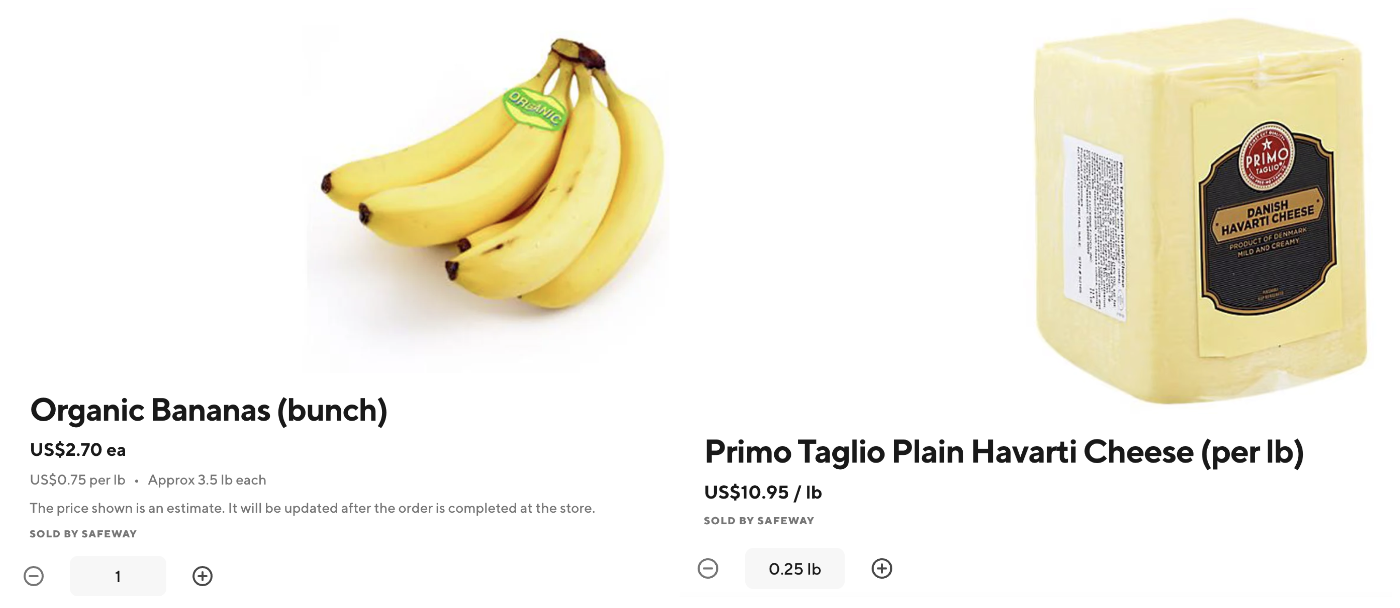
At the very least, a weighted item flag (TRUE/FALSE) needs to be provided in both the Inventory Feed and catalog file. Additionally, what is preferred in the catalog file is even a little more nuanced (cx_show_by & price_by). Some items (deli meat) are priced by the lb and sold to the customer by the lb. However, some items (bananas) are often priced by the lb, but sold to the customer in discrete units (5 bananas, 2 bunches, etc. as opposed to 1.5 lbs of bananas). Therefore, receiving average weight is also a highly recommended field in the catalog file to accurately show a rough price to the customer based on the number of discrete units. If this is not received, DoorDash will source average weights from our repository of Meat, Fish, & Produce data. DoorDash does have the ability to show to the customer both types of weighted item experience (weighted discrete units and weighted pick your increments). Examples below.
I see an error in our catalog on DoorDash. What do I do?
Contact your Account Owner! They can relay to the catalog team and get that taken care of as soon as possible. This can be things like incorrect taxonomy, image, tem name, weight, etc. Screenshots and specific examples are helpful (i.e. this “Organic Bananas (bunch)” item has an incorrect taxonomy as opposed to “there are a bunch of taxonomy errors”). Feel free to send in whatever form is easiest for you (spreadsheet, doc, etc.). If needed, we can work out a cadence where you can send something like this over on a monthly basis. DoorDash does have its own QA process as well when building new SKUs, and we keep an eye out and have an internal reporting system for error catching as well.
The item names on DoorDash differ from that on our site. Why is this?
DoorDash has a strict style guide to maintain consistency for our customers across merchants. For this reason, merchant provided item names are converted to DoorDash style guided item names.
DoorDash Taxonomy is different from our taxonomy. Why is this?
DoorDash also has a set list of taxonomy categories it utilizes, depending on the merchant’s vertical (grocery, convenience, alcohol, retail, pets, etc.). For this reason, DoorDash converts merchant provided taxonomy into DoorDash taxonomy. If you see taxonomy errors, please flag them to your Account Owner. Mistakes happen as this is a manual process for DoorDash.
What are these merchandising carousels? Can we change them?
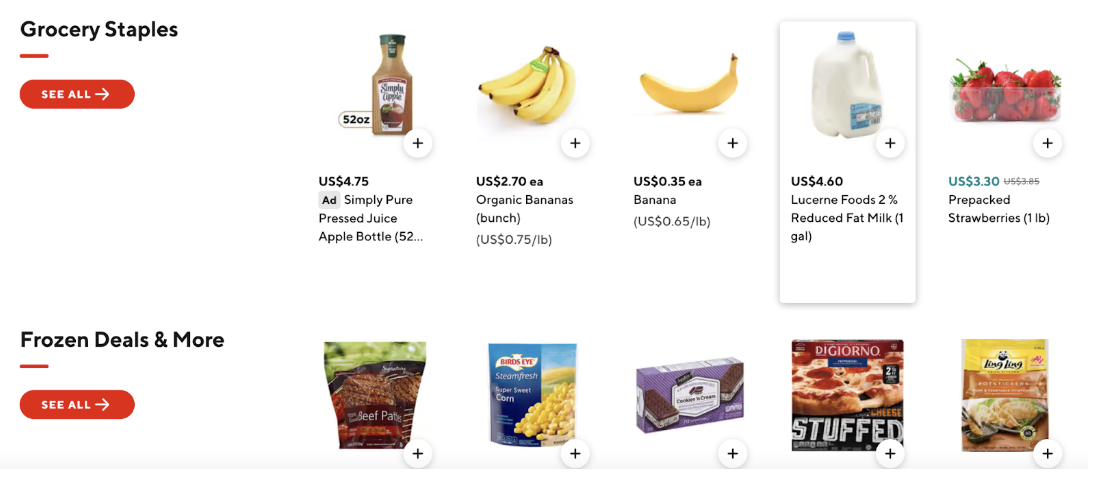
DoorDash calls these Collections. Yes, we can change them for you! We have a recommended set for you, and will automatically attribute SKUs to them, but we are happy to work with you on which Collections we surface, which order they are in, and what SKUs show for them. Please submit any requests or feedback to your Account Owner!
How does the overall catalog building process work?
DoorDash uses a network of vendors and internal team members to take merchant provided data and transform it into DoorDash data. There are many manual components of this still; if you see errors, bear with us and we will correct ASAP!
What kind of UPC should I provide?
GTIN-14 is preferred. However, DoorDash has a normalization process in place. Therefore, any format (with check digit, without check digit, GTIN-14, etc.) are all acceptable! We will normalize the provided values to our systems. Inventory Feed
Do I need to use a dated folder when transferring my Inventory Feed File?
If all stores are included in a single daily file, creating a dynamic daily folder is unnecessary.
What time of day is best to share my Inventory Feed File?
General guidance is to share overnight to ensure store inventory is updated for the morning, but this will largely depend on your internal inventory update processes. If your inventory is most accurate mid-day because of a batch update job that runs, we would like to receive the file after that process is complete.
What if I don’t have item-level taxes?
If the item + store level tax information cannot be provided via the Inventory Feed, DoorDash will apply tax rates to item categories via a manual process. Please indicate that you cannot supply this information on your Inventory Feed Data Collection Form, and your TAM will kick off the process of applying these rates with the DoorDash tax team.
Reporting
Can I customize DoorDash Standard Reports to my system needs?
Yes, DoorDash can update certain aspects of your reports such as Report Name, Location, and Field Names. We can also limit the fields provided within the standard template. If additional fields are required, please reach out to your AO for further information.
How can I review transactions on my DoorDash Marketplace Store?
Take advantage of our Reporting API!