Merchant Onboarding Flow: Launching New Stores
New Merchant onboarding is handled by the streamlined Self-Serve Integration Onboarding (SSIO) flow, designed to significantly reduce the time from sign-up to going live. This onboarding process automates manual steps and provides greater visibility for Merchants, Partners, and DoorDash operators.
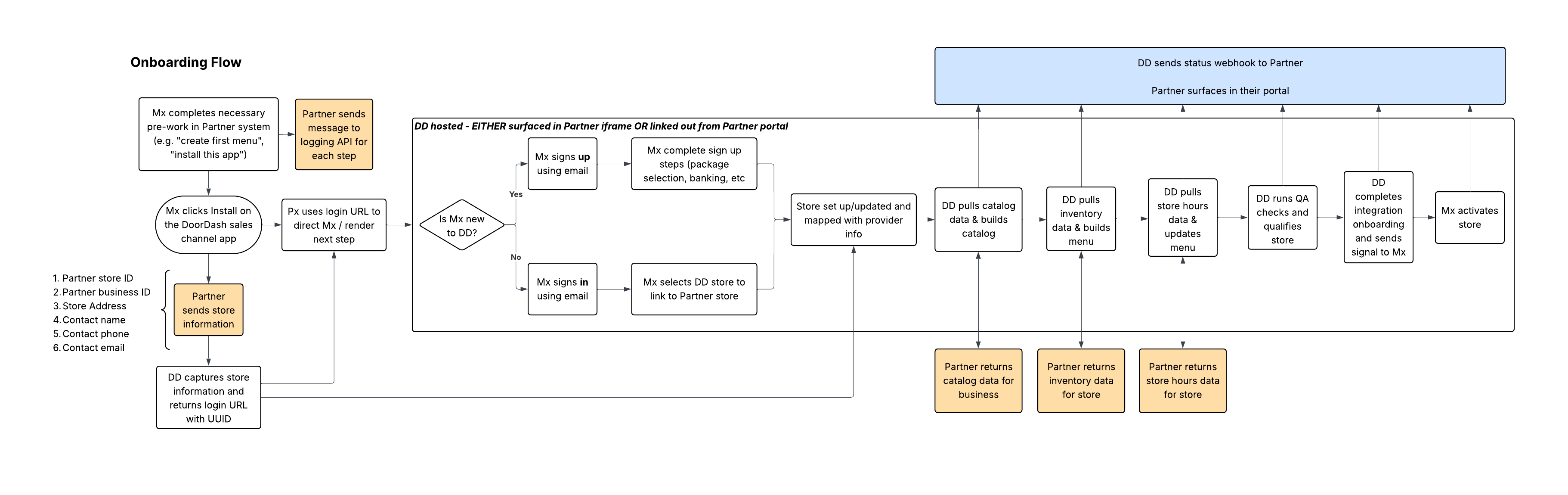
API List
| API | Purpose | Direction |
|---|---|---|
| Onboarding Request | Initiate onboarding for each Merchant; retrieve unique sign-up/sign-in URL | Partner → DoorDash |
| Store Onboarding Status Webhook | Consume current integration onboarding status; surface to Merchant in Partner portal | DoorDash → Partner |
| Catalog Pull | Host an API that passes robust item details upon request from DoorDash to support new store onboarding | Request: DoorDash → Partner Response: Partner → DoorDash (verbose) |
| Inventory Pull | Host an API that passes item pricing/availability information upon request from DoorDash to support new store onboarding | Request: DoorDash → Partner Response: Partner → DoorDash (verbose) |
| Store Hours Pull | Host an API that passes store hours info upon request from DoorDash to support new store onboarding | Request: DoorDash → Partner Response: Partner → DoorDash (verbose) |
Merchant Eligibility Requirements
Partners must require Merchants to meet minimum Catalog data quality requirements to be eligible for a DoorDash integration. Merchants should not be allowed to begin the DoorDash onboarding flow without meeting the minimum eligibility requirements.
Minimum Requirement
At least 200 items must contain the following attributes:
- Item name
- Merchant-supplied item ID
- UPC
- Size
- Extended size
Recommended Attributes
Including the following attributes will reduce the time it takes for new items to go live:
- Image
- Brand name
- Description
Onboarding Initiation
Once Partner pre-work is complete, the Merchant clicks the add-on within the Partner portal to initiate onboarding to the DoorDash integration.
The Partner must then send a store onboarding request to the DoorDash Onboarding API.
Important Notes
- Until the onboarding status
BUSINESS_ID_MAPPEDhas been received, the Merchant should retain access to the button used to initiate onboarding. - The Partner must retain internal ability (accessible to non-engineering operators) to reinitiate onboarding.
- Only one store is supported per request. If multiple stores are passed, validation will fail.
Onboarding Endpoint
POST https://openapi.doordash.com/marketplace/api/v2/managed_merchant_connect_url
Content-Type: application/json
Request Body Example
{
"location_id": "example_store_456",
"location_group_id": "example_biz_123",
"store_name": "Empanada Empire",
"location_name": "Candler",
"address": {
"line_1": "101 DoorDash St.",
"line_2": "Suite #5",
"city": "Atlanta",
"state": "GA",
"zip": "30312"
},
"first_name": "James",
"last_name": "Walnut",
"business_phone": "+14124818894",
"expected_go_live_date": "2026-01-15",
"order_protocol": "POS",
"fulfillment_protocol": "MERCHANT_PICK",
"locale": "en-US"
}
Request Fields
| Field | Type | Required | Description | Accepted Values |
|---|---|---|---|---|
location_id | string | Yes | Unique identifier of the store in Partner system (becomes location_id in API calls) | - |
location_group_id | string | Yes | Unique identifier of the parent business in Partner system | - |
store_name | string | Yes | Customer-facing name of the store | - |
location_name | string | No | Location-specific context | - |
address.line_1 | string | Yes | Street address | - |
address.line_2 | string | No | Apartment, suite, etc. | - |
address.city | string | Yes | City | - |
address.state | string | Yes | State (2-letter code) | e.g., GA |
address.zip | string | Yes | ZIP/postal code | - |
first_name | string | Yes | First name of user initiating request | - |
last_name | string | Yes | Last name of user initiating request | - |
email | string | Yes | Email (must be Business Admin in DoorDash Merchant Portal) | - |
business_phone | string | No | Phone number for requestor | - |
expected_go_live_date | string (YYYY-MM-DD) | No | Expected activation date (best effort) | ISO date (YYYY-MM-DD) |
merchant_decision_maker_email | string | Yes | Merchant email | - |
order_protocol | enum | Yes | Order routing method | POS, TABLET |
fulfillment_protocol | enum | Yes | Shopping/fulfillment protocol | MERCHANT_PICK, DASHER_PICK |
locale | enum | Yes | Locale for onboarding flow | en-US |
Success Response (200)
{
  "managed_merchant_connect_url": "https://identity.doordash.com/auth/user/signup/?response_type=code&redirect_uri=..."
}
Success Response Fields
| Field | Type | Description |
|---|---|---|
managed_merchant_connect_url | string | Unique onboarding URL. By completion, Merchant will have a DoorDash account and linked store. |
Using the DoorDash Managed Merchant URL
When you call the NV SSIO onboarding API, DoorDash returns a managed_merchant_connect_url (managed merchant URL). This URL is unique to that merchant onboarding and is intended to be:
- Cached by your system, and
- Continuously surfaced to the merchant (for example, as a “Complete DoorDash setup” or “Manage DoorDash integration” button in your portal).
Under normal conditions, the merchant can use this same URL over time to:
- Log in or sign up with DoorDash, and
- View the status of their DoorDash onboarding and integration.
Will this URL ever stop working?
The URL itself does not have a simple time-based expiration, but what the merchant can do with it depends on the underlying DoorDash onboarding status:
- In-progress / successful onboarding
- The URL will continue to work for sign-in and for viewing onboarding status.
- You may safely keep showing the same URL in your portal.
- Abandoned onboarding (critical case)
- If the onboarding reaches an ABANDONED state in DoorDash systems (for example, due to mismatched store info or other blocking issues), the merchant will not be able to complete onboarding using that original URL.
- In this case, the merchant must re-initiate onboarding with DoorDash via a new NV SSIO onboarding request from your system.
What you need to support as a Partner
To ensure a good merchant experience, your implementation should:
- Cache and surface the managed merchant URL after the initial NV SSIO onboarding request.
- Monitor onboarding status (via the DoorDash Store Onboarding Status webhooks).
- Detect ABANDONED status and, when it occurs: Show clear messaging to the merchant that their previous onboarding attempt could not be completed, and
- Provide a way to re-initiate DoorDash onboarding, which should trigger a new NV SSIO onboarding API call and generate a fresh managed merchant URL. This ensures merchants can always move forward, even if their first onboarding attempt cannot be completed.
Notes
- Only One Store is supported for now
- The Partner must only pass one store in the payload. If multiple stores are passed, we will fail the validation.
- Redirect to DoorDash
- The Partner must redirect the Merchant to the URL returned by this API.
- DoorDash hosts and manages the full flow, including:
- Merchant Authentication/Authorization
- Store creation (if applicable)
- Initiation of Provider linking
- DoorDash-hosted completion
- After the Merchant completes the DoorDash-hosted steps:
- DoorDash displays a confirmation page.
- DoorDash continues the provider linking process asynchronously.
- The confirmation page polls internally for the linking status.
- After the Merchant completes the DoorDash-hosted steps:
- Terminal merchant experience
- When the linking status reaches INTEGRATION_REQUESTED:
- DoorDash informs the Merchant that the request has been received.
- The Merchant is instructed to continue the remaining steps in the Provider’s portal.
- The Merchant is prompted to close the tab.
- When the linking status reaches INTEGRATION_REQUESTED:
- Redirect and status handling
- DoorDash does not redirect the merchant back to the Provider’s portal.
- DoorDash does not append any query parameters.
- Providers must rely on backend status updates (e.g., webhooks or status APIs) to track progress after the Merchant closes the tab.
Error Responses
400 --- Invalid Argument
{
  "error": "INVALID_ARGUMENT",
  "message": "merchant_decision_maker_email is required"
}
409 --- Store Already Exists
{
  "error": "STORE_ALREADY_EXISTS",
  "message": "Store with partner_store_id 'shopify_store_456' is already onboarded"
}
Error Status Codes
| Status Code | Error | Description |
|---|---|---|
| 400 | Bad Request | Missing or invalid required field |
| 401 | Unauthorized | Invalid or expired API key |
| 409 | Conflict | Store already onboarded (duplicate partner_store_id) |
| 429 | Too Many Requests | Rate limit exceeded |
| 500 | Internal Server Error | DoorDash system error |
Relevant SOW Status
| Status | Description | When Sent |
|---|---|---|
INTEGRATION_REQUESTED | Merchant authenticated and store mapping created | Immediately after tab closes |
Merchant Onboards within DoorDash Environment
Following a successful onboarding request, the Partner will surface the unique URL provided in the response to the Merchant.
- EITHER embedded in the Partner portal as an iframe
- OR by redirecting the Merchant to the URL in a new browser tab
From this point on, the Merchant will handle their onboarding within the DoorDash environment, including tracking their progress. DoorDash will send out store onboarding status webhooks to the Partner, with the expectation that the Partner will surface these in an independent onboarding tracker within the Partner portal.
There are 2 classes of Merchants, from an onboarding perspective:
- Merchants that are new to DoorDash Marketplace (have never signed a contract)
- Merchants that are already live on DoorDash Marketplace
The onboarding flow within the DoorDash environment will handle both cases, as shown below:
| Merchant New to DoorDash | Merchant Live on DoorDash |
|---|---|
| Sign up for DoorDash - Create account - Select category - Enter store hours - Select package - Enter banking information 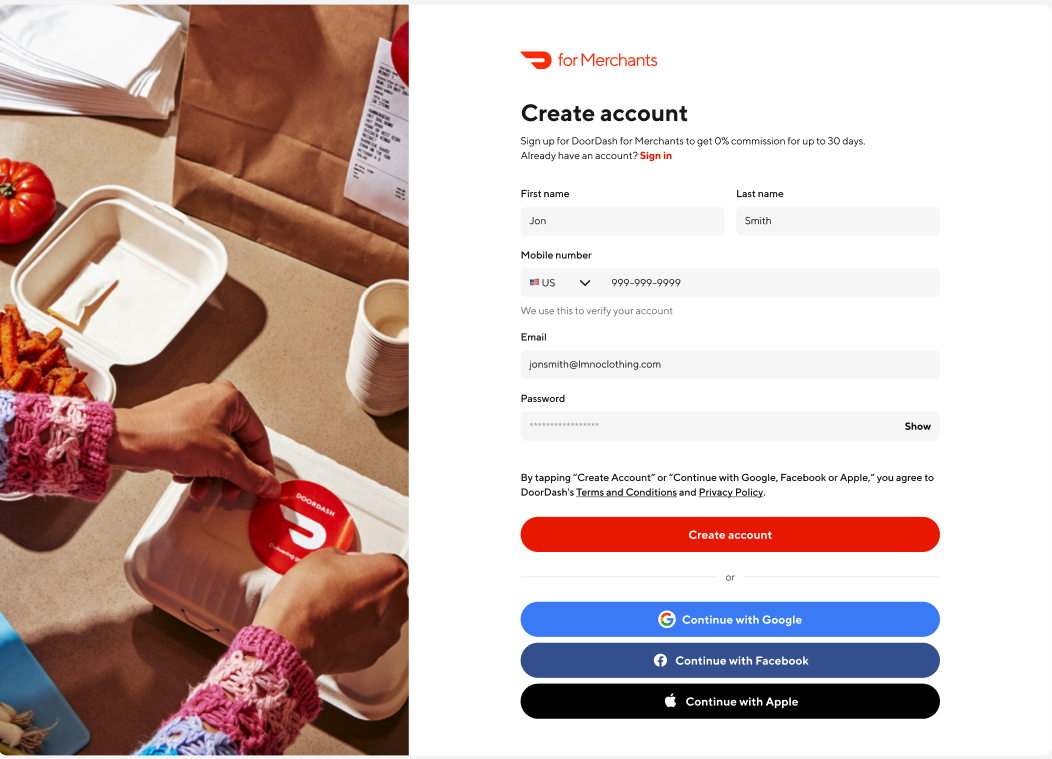 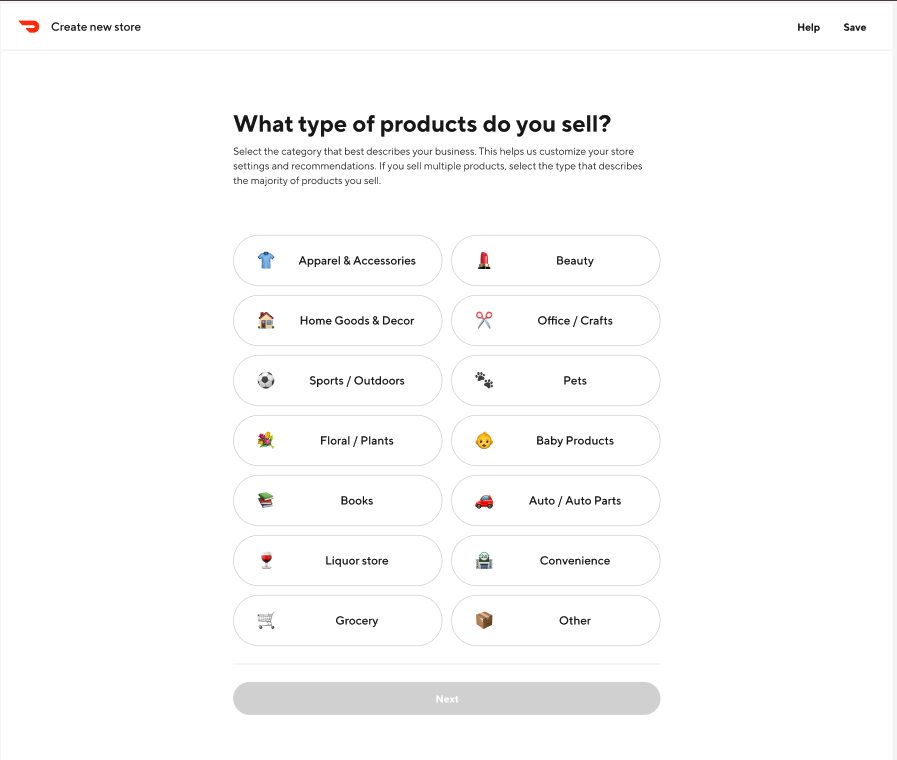 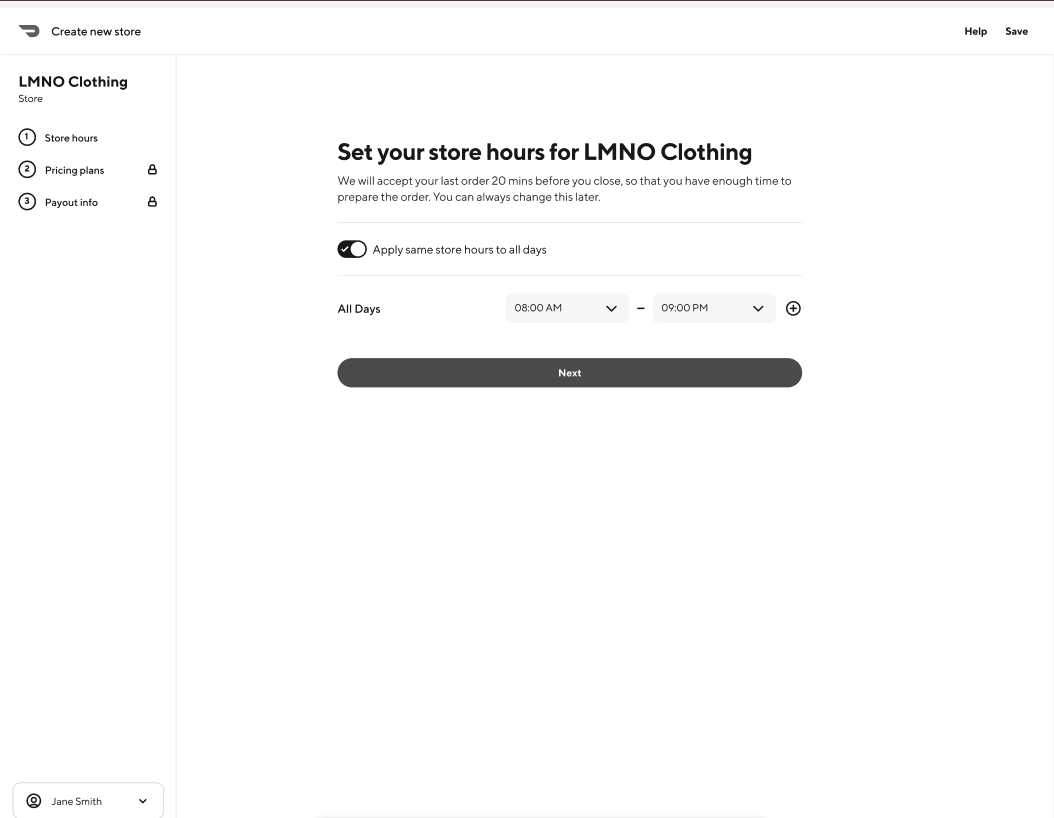 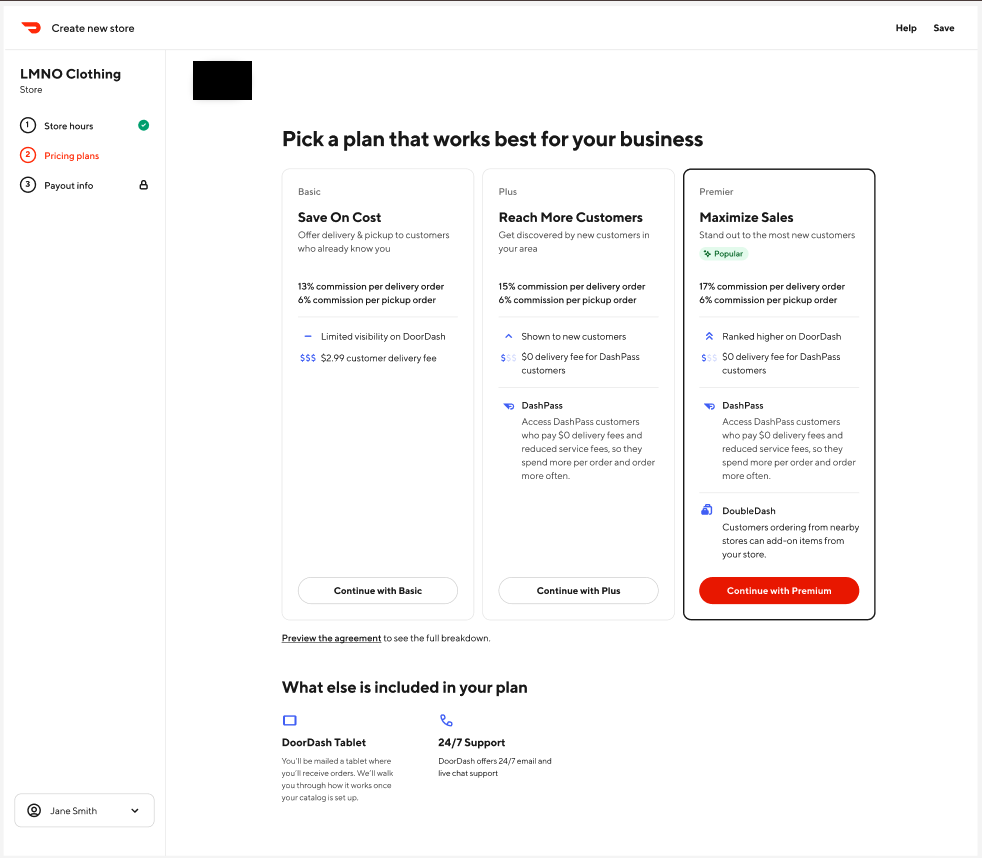 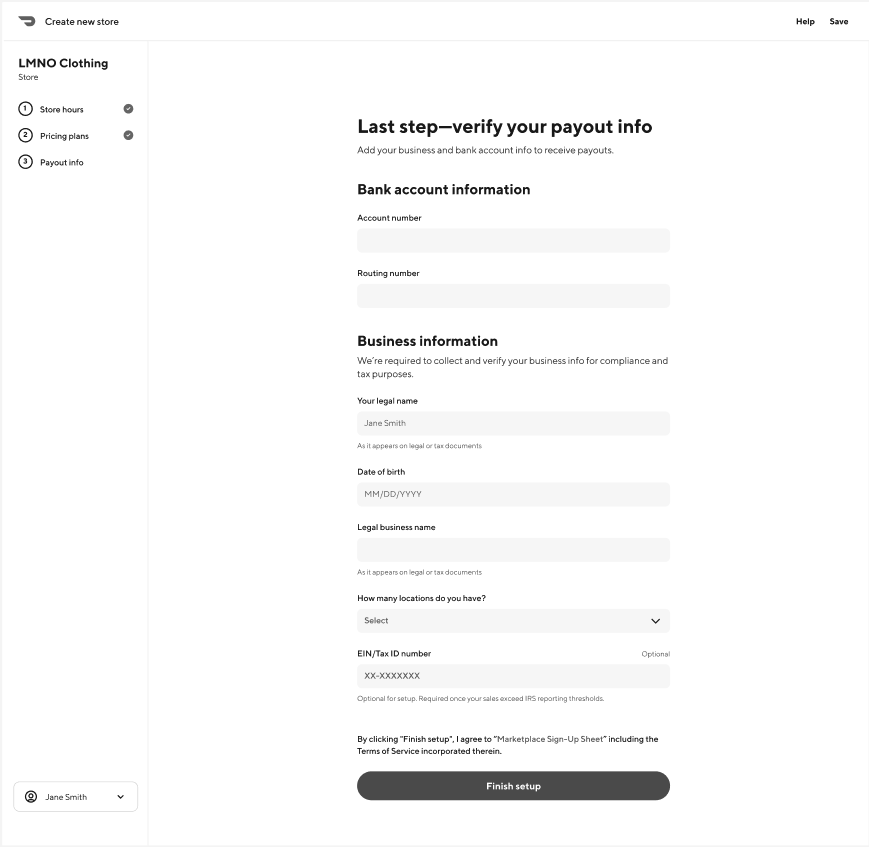 | Sign in to DoorDash 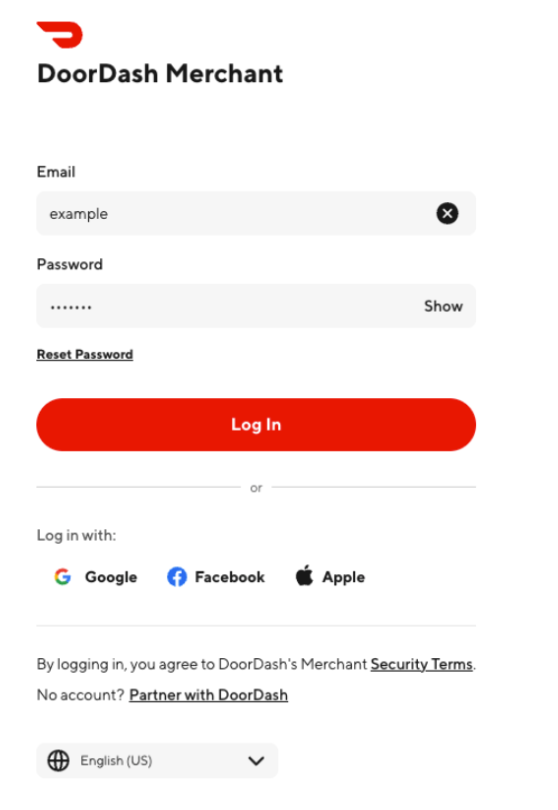 |
| Automated Store Matching DoorDash will match the information provided by the Partner in the onboarding request to the store created by the Merchant during signup using the unique identifier in the login URL | Store Matching Confirmation DoorDash will prompt the Merchant to select which DoorDash store to match to the Partner store included in the onboarding request 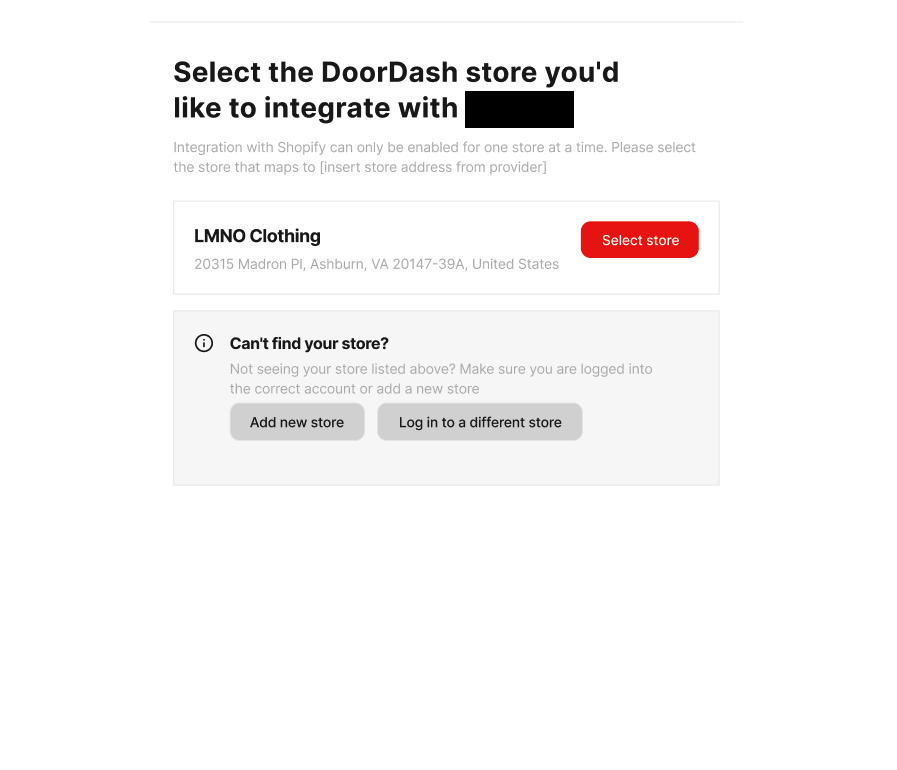 |
Activation Tracker 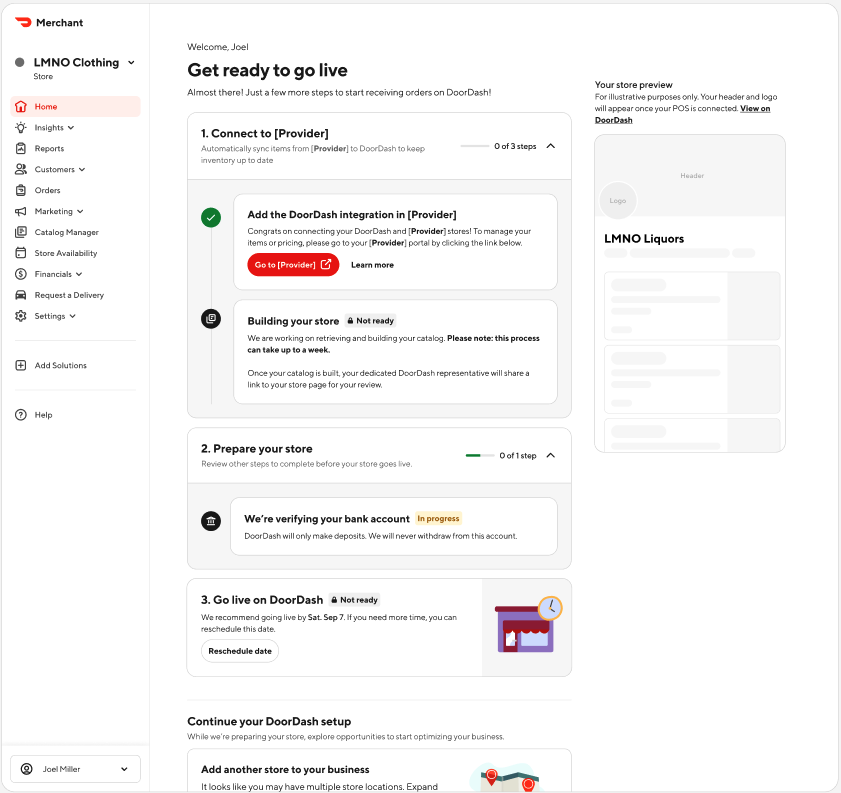 | Activation Tracker 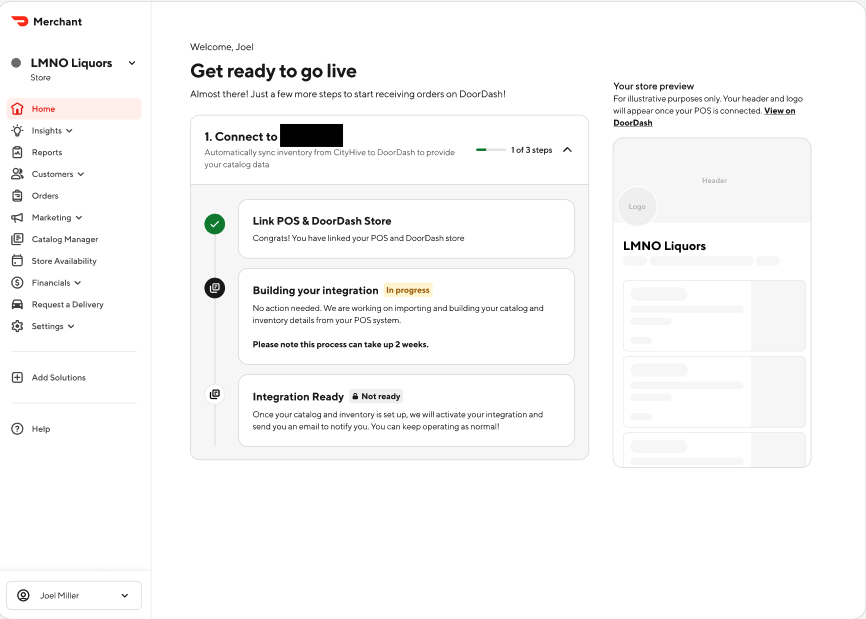 |
| Catalog pull DoorDash will pull catalog data from Partner-hosted API DoorDash will send status webhooks to the Partner - BUSINESS_ID_MAPPED 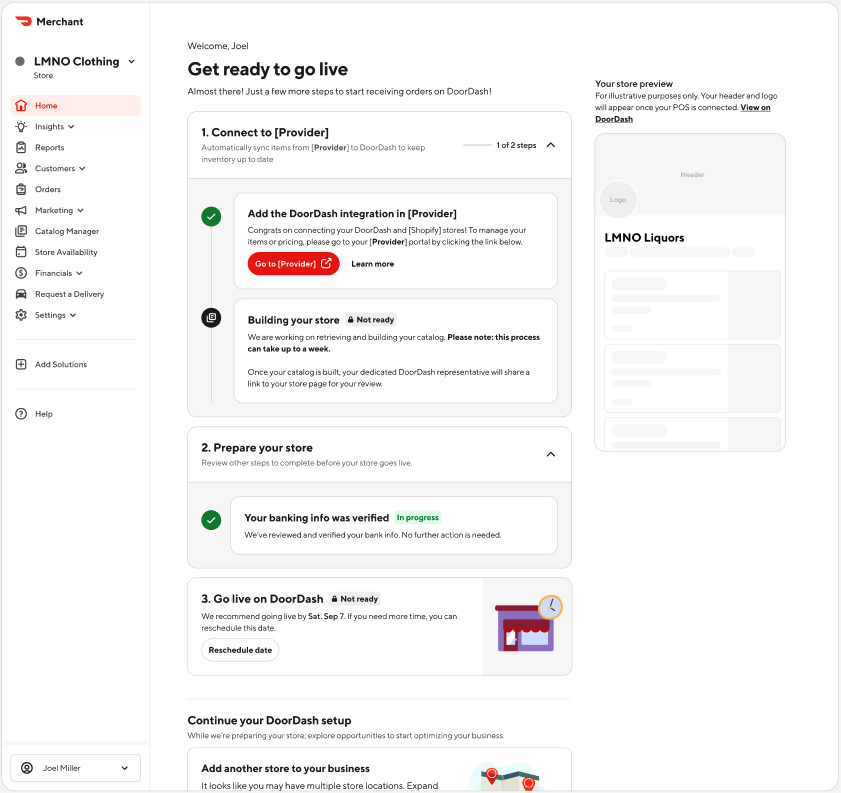 | Catalog pull DoorDash will pull catalog data from Partner-hosted API DoorDash will send status webhooks to the Partner - BUSINESS_ID_MAPPED |
| Catalog build DoorDash will use automated and human-driven processes to take the raw catalog data and produce robust item listings ready to surface on Customer-facing store pages DoorDash will send status webhooks to the Partner - CATALOG_RECEIVED - CATALOG_BLOCK | Catalog build DoorDash will use automated and human-driven processes to take the raw catalog data and produce robust item listings ready to surface on Customer-facing store pages DoorDash will send status webhooks to the Partner - CATALOG_RECEIVED - CATALOG_BLOCK |
| Inventory pull DoorDash will pull inventory (pricing and availability) data from Partner-hosted API, and use that data to create a DoorDash Marketplace menu for the store. DoorDash will send status webhooks to the Partner - MENU_REQUESTED - MENU_BLOCK | Inventory pull DoorDash will pull inventory (pricing and availability) data from Partner-hosted API, and use that data to create a DoorDash Marketplace menu for the store. DoorDash will send status webhooks to the Partner - MENU_REQUESTED - MENU_BLOCK |
| Store hours pull DoorDash will pull store hours data from the Partner-hosted API, and apply those hours to the DoorDash Marketplace menu. DoorDash will send status webhooks to the Partner - MENU_BLOCK | Store hours pull DoorDash will pull store hours data from the Partner-hosted API, and apply those hours to the DoorDash Marketplace menu. DoorDash will send status webhooks to the Partner - MENU_BLOCK |
| Menu QA DoorDash will review the menu for quality DoorDash will send status webhooks to the Partner - MENU_QUALIFIED | Menu QA DoorDash will review the menu for quality DoorDash will send status webhooks to the Partner - MENU_QUALIFIED |
| Onboarding finalization DoorDash will complete the final configurations necessary DoorDash will send status webhooks to the Partner - INTEGRATION_ACTIVATED After this point, Partner should enroll the store in all regular integration updates 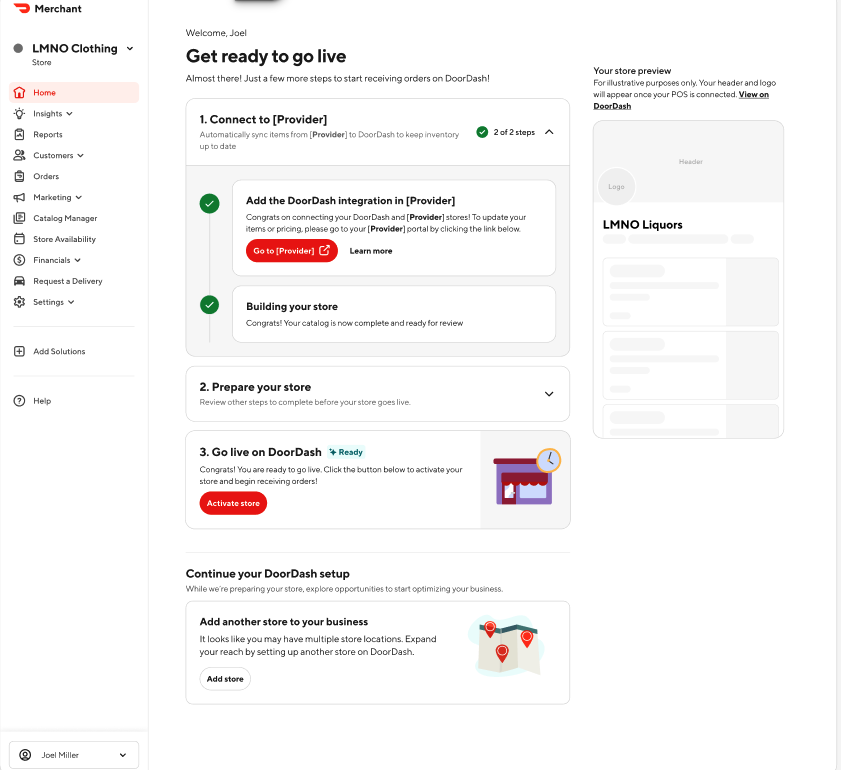 | Onboarding finalization DoorDash will complete the final configurations necessary DoorDash will send status webhooks to the Partner - INTEGRATION_ACTIVATED After this point, Partner should enroll the store in all regular integration updates |
| Activation The Merchant will determine when to activate their DoorDash Marketplace store to start receiving orders | Re-Activation Existing Merchant stores will automatically be re-activated following integration onboarding, minimizing downtime. |
Merchant Visibility and Control
This section documents the Store Onboarding Status Webhook, full onboarding status values, exclusion codes, and DoorDash remediation actions.
Tracking
Merchants will have access to an integration tracker within their DoorDash Merchant Portal, allowing them to monitor the progress of their integration, identify any blockers, and understand when their integration will be ready.
To give Merchants access to this onboarding tracker, the Partner should continue to surface the login URL within the Partner Portal. Merchants can log in to the DoorDash environment and view the onboarding tracker. Additionally, it is recommended that Partners consume the store onboarding status webhooks and surface the information contained therein to Merchants within the Partner portal, in a separate onboarding tracker.
Store Onboarding Status Webhook
After successfully submitting the store onboarding request, an onboarding entry will be persisted in the DoorDash store onboarding platform. Onboarding status should be shown to the Merchant in the partner environment as part of the onboarding experience. There are two ways to check the current progress of the onboarding status, but you are required to subscribe to the webhook events; using the GET endpoint is an optional enhancement:
- [REQUIRED] Subscribe to Webhook Events
Partners must have an endpoint configured to listen to DoorDash store onboarding status webhooks. To enable this, the partner will register a subscription endpoint for the Event Type "Onboarding status" for DoorDash to send webhooks to via DoorDash Developer Portal. Once a status changes on the onboarding store, a webhook event will be sent to the provided subscription endpoint. If a webhook fails, it will be retried 3 times. The payload format for this webhook will be the following:
Webhook Payload Example
{
  "onboarding_id": "9154103a-be82-48fc-978d-792171f7ee32",
  "location_id": "xdDJSnx",
  "doordash_store_uuid": "f1c7f43b-64ca-4586-b990-171aaafbca2d",
  "status": "ABANDONED",
  "exclusion_code": "DUPLICATE_LOCATION_ID",
  "details": "",
  "menus": [
    {
      "menu_uuid": "949e6d70-371a-4250-8fe7-2d13b141e07g",
      "menu_preview_link": "https://doordash.com/menu/1234",
      "menu_error": "reason why menu failed to be pulled"
    }
  ]
}
- [Optional] Call DoorDash GET API endpoint
Partners can make a GET http method to a DoorDash API endpoint to get the same information returned from the webhook noted above. Subscribing to the Store Onboarding Status webhook (above) is mandatory as part of implementation to avoid missing any updates in the onboarding status progress. Using this GET API endpoint is not a suitable replacement for subscribing to the webhook notifications.
Request Endpoint:
"request": {
  "method": "GET",
  "header": [
    {
      "key": "Authorization",
      "value": "Bearer <Partner JWT>",
      "type": "text"
    },
    {
      "key": "auth-version",
      "value": "v2",
      "type": "text"
    },
    {
      "key": "User-Agent",
      "value": "<Partner User Agent value>",
      "type": "text"
    }
  ],
  "url": "https://openapi.doordash.com/marketplace/api/v2/store_onboarding/<onboarding_id>",
  "protocol": "https"
}
Query Parameter:
No query parameter is needed.
Response (Response Code 200):
{
  "onboarding_id": "9154103a-be82-48fc-978d-792171f7ee32",
  "location_id": "xdDJSnx", [unique store/location id on the partner side],
  "doordash_store_uuid": "f1c7f43b-64ca-4586-b990-171aaafbca2d",
  "status": "ABANDONED",
  "exclusion_code": "DUPLICATE_LOCATION_ID",
  [if applicable - reason pre-onboarding validation failure]
  "details": "", [additional details]
  "menus": [
    {
      "menu_uuid": "949e6d70-371a-4250-8fe7-2d13b141e07g",
      "menu_preview_link": "https://doordash.com/menu/1234"
      "menu_error": "reason why menu is failed to be pulled"
    }
  ]
}
Webhook Fields
| Field | Type | Description |
|---|---|---|
onboarding_id | string (UUID) | Unique onboarding identifier |
location_id | string | Unique store identifier from Partner system |
doordash_store_uuid | string (UUID) | DoorDash store UUID |
status | string | Current onboarding status |
exclusion_code | string | Provided when onboarding is blocked or abandoned |
details | string | Additional context |
menus | array | Menu-level information (if applicable) |
Possible Onboarding Status Values
| Status | Description |
|---|---|
⌛INTEGRATION_REQUESTED | Merchant authenticated; business/store configuration and catalog build in progress |
✅STORE_CONNECTED | Store successfully matched to a DoorDash store |
✅BUSINESS_ID_MAPPED | External business ID mapped to DoorDash business ID |
⌛CATALOG_REQUESTED | Catalog data requested from Partner via Catalog Pull |
✅CATALOG_DATA_RECEIVED | Catalog data receipt confirmed |
🔴CATALOG_PULL_FAILED | Catalog pull failed or data not received |
⌛MENU_REQUESTED | Menu creation initiated |
⌛MENU_IMPORTED | Menu ingestion validated successfully |
⌛HOURS_SET | Store hours validated and confirmed |
⌛MENU_AUDIT | Auto QA in progress to verify menu quality |
🔴MENU_BLOCK | Menu ingestion failed or validation unsuccessful |
✅MENU_QUALIFIED | Menu passed auto QA and ready for activation |
✅INTEGRATION_ACTIVATED | POS integration activated successfully |
🔴ACTIVATION_BLOCK | POS activation attempt failed |
🔴ABANDONED | Onboarding abandoned due to validation failure or internal error |
Possible Exclusion Code Values
Note: The below exclusion code values may occur when activation is blocked due to store or menu validation.
| Category | Exclusion Code | Description |
|---|---|---|
| ABANDONED | DUPLICATE_LOCATION_ID | Location ID/provider combination already used on another POS store |
| ABANDONED | VIRTUAL_BRAND_DETECTED | Store identified as virtual concept not supported by integration |
| ABANDONED | SELF_DELIVERY_DETECTED | Store has Self Delivery enabled but integration does not support it |
| ABANDONED | DOORDASH_DRIVE_STORE | DoorDash Drive stores cannot be onboarded to Marketplace |
| ABANDONED | STORE_LIVE_ON_REQUESTED_POS_PROVIDER | Store already live on requested POS integration |
| ABANDONED | SFDC_ACCOUNT_RECORD_NOT_FOUND | No internal DoorDash account found for store |
| MENU_BLOCK | MENU_PULLING_REQUEST_FAILURE | Internal menu job failure |
| MENU_BLOCK | STORE_HOURS_NOT_POPULATED_FAILURE | Missing or invalid store hours |
| MENU_BLOCK | MENU_BLANK_FAILURE | Menu contains no items |
| MENU_BLOCK | MENU_JOB_FAILURE | Menu ingestion failed due to structural issues |
DoorDash Action on Exclusion Codes
DoorDash Integration Onboarding team monitors SSIO exclusion values on a daily basis in near-realtime to help merchants and partners alike get unblocked for an optimal merchant experience. The below table outlines the action that the Integration Onboarding team takes when certain exclusion codes are observed in SSIO production volume.
| Status | Exclusion Code | DoorDash Action |
|---|---|---|
| ABANDONED | DUPLICATE_LOCATION_ID | Confirm correct location_id with Merchant and Partner; unblock if duplicate store decommissioned |
| ABANDONED | STORE_LIVE_ON_REQUESTED_POS_PROVIDER | Notify Merchant that store is already live on requested integration |
| MENU_BLOCK | STORE_HOURS_NOT_POPULATED_FAILURE | Confirm missing hours; notify Merchant to update hours with Partner |
| MENU_BLOCK | MENU_JOB_FAILURE | Confirm failure reason; notify Merchant with error details |
| MENU_BLOCK | MENU_BLANK_FAILURE | Notify Merchant of blank menu; instruct to republish via Partner |
Activation
Activation is the operation by which a store’s Customer-facing menu is made publicly available for ordering. There are two classes of Merchants: (1) those net new to DoorDash and (2) those already live on DoorDash.
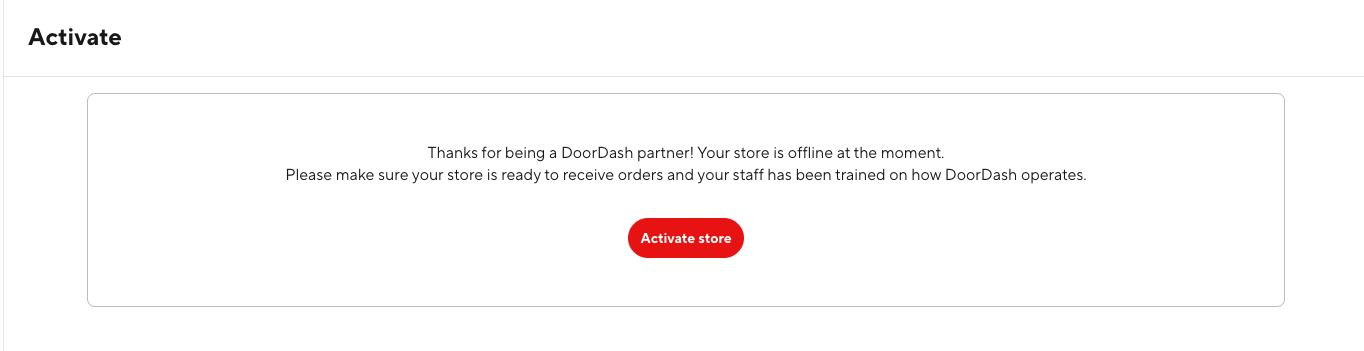
- Net New Merchants: Merchants will be empowered to choose when to go live (see screenshot below). They will have a dedicated DoorDash onboarding staff member who will walk them through activation, following extensive training.
- Existing Merchants: For those Merchants already live on DoorDash and transitioning onto an integration, the primary aim will be to reduce Customer-facing menu downtime: these Merchants will be reactivated as soon as an integrated menu is successfully created.
Testing the Onboarding Flow
Scenarios
| Merchant Use Case | Path | Description | Special Integrator Actions | Special TAM Actions |
|---|---|---|---|---|
| Conversion | Happy | Existing business and store, new to integration provider. Smooth onboarding end-to-end with no blockers. | N/A | Prepare conversion test store |
| Conversion | Unhappy | Existing business and store, new to integration provider. Onboarding hits at least one blocker. | Ensure at least one of the following fails: catalog pull, inventory pull, store hours pull. Prepare conversion test store. | Prepare conversion test store |
| Net New | Happy | Net new business and store. Smooth onboarding end-to-end with no blockers. | Complete net new sign-up (see below). | N/A |
| Net New | Unhappy | Net new business and store. Onboarding hits at least one blocker. | Complete net new sign-up (see below). Ensure at least one of the following fails: catalog pull, inventory pull, store hours pull. | N/A |
Conversion Use Case: Existing Test Business + Existing Test Store
- Provide an email alias - different from the email address you use to log into the Developer Portal - to Support / your Technical Account Manager.
- Wait for confirmation from Support / your Technical Account Manager
that a merchant account and conversion store are ready.
- You will be given a test store name. Save this information.
- You will be given a test store address. Save this information.
- Navigate to the Merchant Portal: https://www.doordash.com/merchant/login
- Enter the email alias you provided and then follow the "Forgot password?" flow to reset the password
- Save the password. You will use it in testing the onboarding flow.
- Send store details to NV SSIO onboarding API.
- You must send the exact test store name and address provided in Step 1. Otherwise, the onboarding will be abandoned immediately.
- Surface onboarding URL.
- Enter dummy merchant email in the initial login screen.
- Enter dummy merchant password in the subsequent sign-in screen.
- Select the appropriate test store.
- If there is confusion about which store to choose, contact Support / your Technical Account Manager.
- Confirm successful completion of onboarding.
- Monitor the store onboarding status webhooks.
- Monitor the merchant-facing DoorDash activation status page (this is shown after completing the net new merchant sign-up flow).
Net New Use Case: Net New Test Business + Test Store
-
Send store details to NV SSIO onboarding API.
-
Surface onboarding URL.
-
Fill out initial login with an unrecognized email (not attached to an existing DoorDash account).
-
Select one of the supported verticals:
- Alcohol
- Retail
- Apparel & Accessories
- Beauty
- Home Goods & Decor
- Office / Crafts
- Sports / Outdoors
- Pets
- Baby Products
- Books
- Auto / Auto Parts
-
Fill out dummy information in the details screen.
- Always include the word
TEST.
- Always include the word
-
Enter dummy banking information (see sandbox values below).
- If any trouble, use the store name "TEST TEST TEST" and the business owner name "Test Test"
-
Confirm successful completion of onboarding.
- Monitor the store onboarding status webhooks.
- Monitor the merchant-facing DoorDash activation status page.
Sandbox Banking Information
United States
| Field | Value |
|---|---|
| EIN | 112332322 |
| Account | 999999992 |
| Routing | 021000021 |
Canada
| Field | Value |
|---|---|
| GST | 123456789 (or 000000000 for Stripe verification) |
| Financial Institution | 000 |
| Transit | 11000 |
| Account | 000123456789 |
Australia
| Field | Value |
|---|---|
| ABN | 00000123456 |
| Address | 222 Exhibition Street, Melbourne, VIC, 3000 Australia (any value OK) |
| BSB | 193879 (or 110000 if noted in your flow) |
| Account | 000123456 |
New Zealand
| Field | Value |
|---|---|
| Account | 1100000000000010 |
| Legal Address | 36 Brandon Street, Wellington Central, Wellington 6011, New Zealand |
| NZBN | 9429050041435 |
Updates for Existing Integration Providers
For integration providers who have already built to the existing onboarding flow, the following changes are required to align with the Self-Serve Integration Onboarding (SSIO) flow.
NOTE: THIS IS A NEW ONBOARDING FLOW AND DETAILS ARE SUBJECT TO CHANGE
Key Differences
-
Pre-work Logging API: This newly introduced API serves as a critical component for tracking the completion of prerequisite tasks. It records essential actions such as the successful processing of payments for add-on services, the confirmation of button clicks within the partner interface, and the verification that all necessary data is prepared and ready for DoorDash's systems. This ensures that all foundational steps are securely logged and verified before proceeding to subsequent stages of the onboarding process.
-
New Store Onboarding Request API: This API represents a significant evolution in how new stores are initiated into the DoorDash ecosystem, directly replacing the previous Store Onboarding Webhook (SOW) process. The SOW process, often characterized by its manual and time-consuming nature, is now fully automated. In response to a successful API request, Partners will promptly receive a unique login URL. This URL is fundamental to the subsequent steps of merchant engagement, offering a more agile and standardized approach to initiating store onboarding.
-
Partner Surfaces Login URL: A key innovation is the mechanism by which partners present the login URL to the merchant. This eliminates the traditional requirement for partners to develop and host their own question-and-answer interfaces for merchant information gathering. Partners now have the flexibility to integrate this login URL seamlessly into their existing platforms. This can be achieved either by embedding the URL within an iframe directly in the Partner Portal, allowing merchants to interact with the DoorDash login within the partner's environment, or by linking to a new tab, directing merchants to a secure DoorDash-hosted page. This approach simplifies the Merchant's initial interaction and reduces the development burden on partners.
-
Merchant Enablement Material: Despite the technological advancements, the provision of comprehensive merchant enablement material remains absolutely crucial for the successful integration and adoption of the DoorDash platform. As such, it is imperative that partners update their existing help center content, documentation, and training materials. These updates must clearly and accurately reflect the new workflow, ensuring that merchants have access to the most current and relevant information to navigate the updated onboarding process effectively.
-
Possible Changes Required: The transition to the new system may necessitate specific refinements, particularly concerning the behavior of the Catalog API. To ensure full advantage is taken of new DoorDash functionalities, field-level adjustments may be required. This is especially pertinent for the extensible "product attributes" object, which may need careful scrutiny and modification to guarantee seamless data exchange and accurate product representation across all platforms.
Unchanged Elements
While several aspects of the onboarding process are undergoing transformation, certain core elements of the integration and onboarding experience will remain unchanged.
- Store Onboarding Status Webhooks: These essential webhooks will continue to operate as a reliable mechanism for partners to track the progress of store onboarding in real-time. To provide enhanced visibility and granular updates, new statuses will be introduced:
- ⌛BUSINESS_ID_MAPPED: This status indicates that the merchant's business ID has been successfully mapped within the DoorDash system, a foundational step in the onboarding journey.
- ⌛CATALOG_REQUESTED: This signifies that a request for the merchant's catalog data has been initiated, signaling the system's readiness to receive product information.
- ✅CATALOG_RECEIVED: This status confirms the successful reception of the merchant's catalog data, indicating a critical milestone in the integration process.
- 🔴CATALOG_BLOCK: This alert indicates an issue or block in processing the catalog, prompting partners to investigate and resolve any discrepancies.
- Core Integration Build: The foundational integrations, which are central to the DoorDash ecosystem, will maintain their established structure and high standards. This includes the seamless integration of catalog data (detailing product offerings), inventory management (ensuring accurate stock levels), store hours (reflecting operational times), and orders integrations (facilitating the flow of customer orders). The existing pull patterns for data synchronization will also remain consistent. Critically, orders integrations will continue to uphold the same rigorous standards of reliability and performance that partners and merchants have come to expect.
- Post-Launch Expectations: Following the successful implementation of these changes, DoorDash is committed to ensuring robust and responsive data synchronization. Both real-time and scheduled refresh patterns are required across all core integrations. This dual approach guarantees that critical data, from catalog updates to inventory changes and order flows, is consistently accurate and up-to-date, supporting optimal operational efficiency for both partners and merchants.
Adoption
DoorDash is introducing a streamlined and enhanced onboarding process for its third-party retail partners. This new flow is designed to improve efficiency, reduce friction, and provide a more robust integration experience for all stakeholders.
Dedicated Support for Existing Partners: To ensure a smooth transition, DoorDash's dedicated team of technical account managers (TAMs) will actively support all existing partners in adopting this new onboarding process. These TAMs possess in-depth knowledge of both DoorDash's platform and various partner systems, enabling them to provide tailored guidance and troubleshooting throughout the adoption phase. Partners are encouraged to leverage this expertise to address any questions or challenges that may arise.
Phased Implementation and Rigorous Testing: The development and implementation of the new onboarding flow will follow a meticulous, multi-stage approach to guarantee stability and success:
- Sandbox Environment Development: The new onboarding flow will be initially developed and configured within isolated sandbox environments. This includes both DoorDash's internal systems and, crucially, within the Partner's own systems. This parallel development in controlled environments allows for iterative design, configuration, and early identification of potential integration points.
- Thorough Testing: Once the initial development is complete, the new flow will undergo end-to-end testing. This comprehensive testing phase will involve a variety of scenarios, edge cases, and performance evaluations to ensure that the system functions as expected, is scalable, and is free of critical bugs or vulnerabilities. This includes functional testing, integration testing, and user acceptance testing (UAT).
- Selective Piloting: Following successful internal testing, the new onboarding flow will be selectively piloted with a small group of volunteer Merchants. This pilot program is crucial for gathering real-world feedback, identifying any unforeseen challenges, and making necessary adjustments before a wider rollout.
- Comprehensive Rollout: Upon successful completion of the pilot phase and incorporation of all necessary improvements, the new onboarding flow will be rolled out comprehensively to all new Merchant onboardings.
Expected Adoption Timeline: The estimated timeline for the comprehensive adoption of the new onboarding flow is approximately 4-6 weeks. This duration is subject to a few key factors:
- Store Onboarding Volume: Partners with a smaller volume of stores onboarding may experience a slightly longer adoption period, since it will take longer to get enough pilot Merchants through the process to review it thoroughly.
- Pilot Success and Feedback Integration: The speed at which feedback from the pilot programs is integrated and any necessary adjustments are made will also influence the overall timeline. Efficient feedback loops will help expedite the process.
- Partner Readiness and Engagement: The readiness and proactive engagement of individual partners in the adoption process will significantly impact their specific timeline. Partners who are prepared with necessary technical resources and dedicated personnel will likely integrate more quickly.
Scheduling Your Adoption: To initiate the adoption process for your organization, please reach out to your assigned DoorDash partner manager or technical account manager. They will be able to provide detailed information, answer specific questions related to your integration, and schedule a tailored adoption plan that aligns with your operational needs. Early engagement is encouraged to ensure a smooth and timely transition to the new onboarding flow.