Merchant Onboarding Requirements for API-Integrated Retail Stores
Merchant Onboarding Flow
The image below presents the merchant onboarding flow.
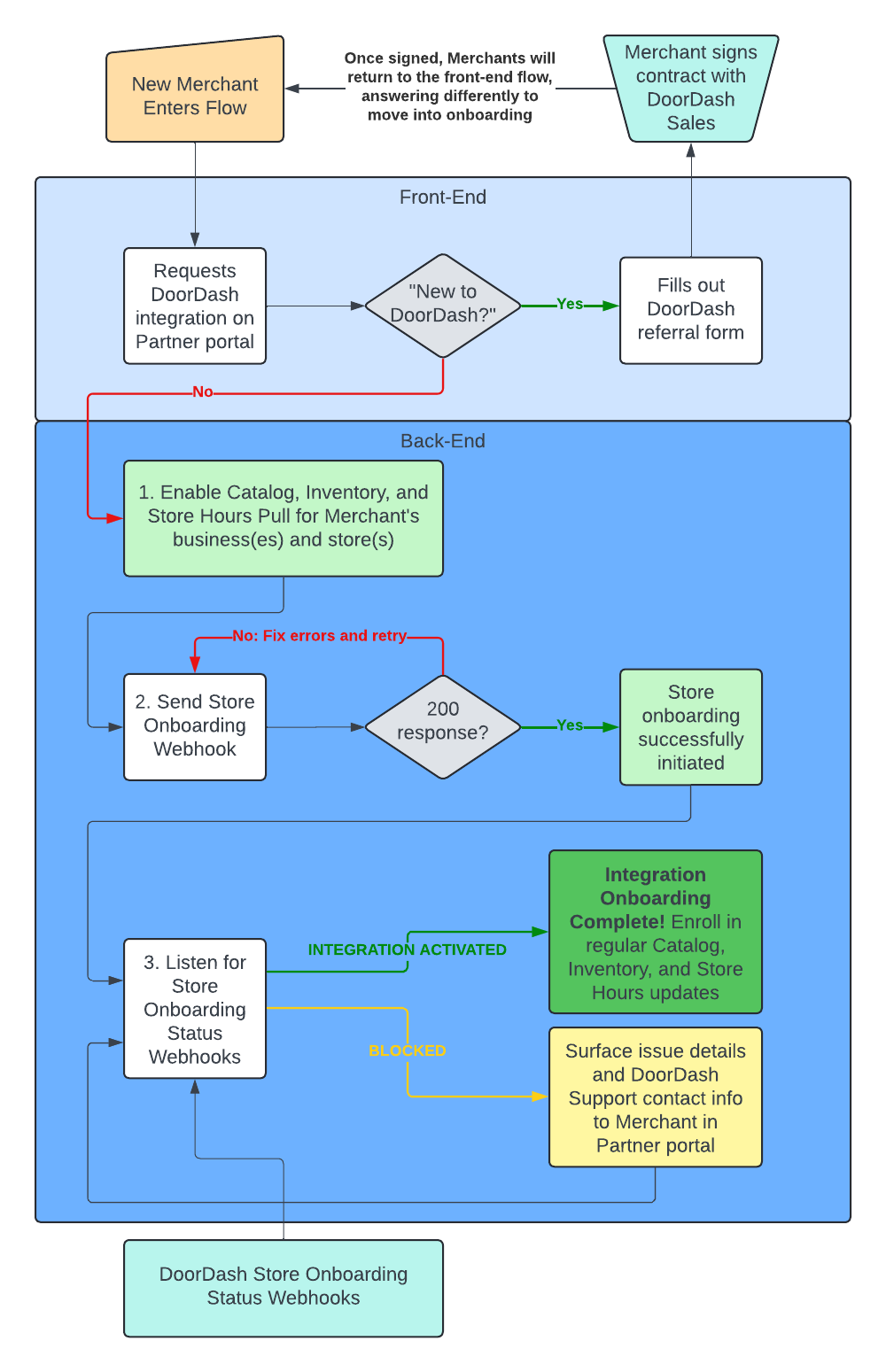
Overview
Building a merchant onboarding process that meets these requirements will deliver a fast and smooth onboarding experience for your merchants.
Onboarding Service Level Agreement: Partner will onboard the Merchant to data delivery within 2 business days of gaining access to the Merchant’s data. For Merchants new to Partner’s platform, it is understood that it will take time to gain access to the Merchants’ data. Onboarding SLAs for net new Merchants will be provided by Partner to DoorDash during Onboarding Process Build.
Flow
Initiation
-
Merchant starts from external Partner environment.
-
Merchant initiates the process (e.g. “Add the DoorDash integration”).
-
Merchant is asked "Are you new to DoorDash Marketplace?"
- If "yes", proceed to New Merchant Signup
- If "no", proceed to Onboarding
New Merchant Signup
-
Partner presents merchant with a DoorDash-provided sales sign-up form.
- Important Note: This form should be business-scoped - if a merchant has more than 1 location, they should only need to fill the form out once.
- Surface a list of the merchant’s locations and instruct them to indicate the locations to include (be sure to default to “All Locations”)
- Important Note: This form should be business-scoped - if a merchant has more than 1 location, they should only need to fill the form out once.
-
DoorDash sales staff will contact the merchant and present a contract.
-
After the merchant completes the sign-up form, partner informs them to return to this DoorDash integration sign-up form within the partner's portal after they've signed their contract with DoorDash.
Onboarding
-
Partner surfaces a form to the Merchant to collect information to send through to the DoorDash Store Onboarding Webhook. This form should be pre-populated with all information the Provider knows about the Merchant (e.g. store address). The form should give the Merchant the ability to override any value that will be subsequently sent to the Store Onboarding Webhook.
- Important: Include the "DoorDash Store ID" field. It should be an optional field, but will be used as a last resort tool to rescue an onboarding blocked because the Store Onboarding Webhook doesn't match to an existing DoorDash store. The Merchant can guarantee a successful match by entering their DoorDash Store ID, which will then be sent through the Store Onboarding Webhook.
-
Partner enables Catalog Pull, Inventory Pull, and Store Hours Pull for the store(s) so that DoorDash can launch the store(s)
-
Partner sends Store Onboarding Webhook
- If 200 response, store onboarding has been successfully initiated. Proceed to step 3
- If not a 200 response, review the errors in the response, fix them, and then resend. If errors are unresolvable, reach out to support in the Developer Portal OR direct merchants to contact DoorDash support
- The most common cause of failure will be a merchant not having yet signed a contract with DoorDash. In that case, proceed to New Merchant Signup
- Otherwise, typically there is a slight mismatch in the addresses on both sides. In that case, direct merchants to contact DoorDash support
-
Partner listens for store onboarding status webhooks
- Once status reaches
INTEGRATION_ACTIVATED, the store has been successfully onboarded to the integration. Enroll the store in regular inventory, catalog, and store hours updates, and in the orders integration (if applicable) - If the status is
ABANDONED,MENU_BLOCK, orACTIVATION_BLOCK, surface those details to the merchant in the partner portal. See "Possible Onboarding Status Values" and "Possible Exclusion Code Values" in the section below for merchant-friendly descriptions of each status and blocker.- While some of these blocked statuses can be resolved by the partner, typically, the most appropriate action is to direct merchants to contact DoorDash support
- Once status reaches
-
Meanwhile, DoorDash will do the following to onboard the store:
- Configure the business and store(s).
- Pull the merchant's catalog using Catalog Pull
- Build the merchant's catalog
- Finish configuring the store(s)
- Onboard the store(s) to the partner's integration
- Ingest inventory and pricing via Inventory Pull to generate menu(s)
- Update store hours using Store Hours Pull
- Review menu quality
- If QA passes (i.e. hours are present, menu is not empty, etc.), DoorDash enables the integration.
- If QA does not pass, DoorDash will email the merchant and partner with exclusion details (e.g. non-compliant alcoholic items, missing hours, etc.).
-
DoorDash will work with the merchant to activate the store
Contact DoorDash Support
Partner instructs merchants: "Please reach out to DoorDash Support at https://help.doordash.com/merchants/s/merchant-support?language=en_US."
API List
Store Onboarding Webhook
- Note: This endpoint does not support sending multiple stores in a single call. Partners must send one webhook per location; if this is not possible then Partners must use the Developer Portal CSV upload route for bulk onboarding requests. Please note that the CSV upload functionality is only available upon a granted exception. Please work with your Technical Account Manager for details.
POST: https://openapi.doordash.com/webhooks/stores/onboarding
{
   "partner_store_id": “abc123_456def”,
   "partner_business_id": “ghi789_101jkl”,
   "doordash_store_id": 123456, [optional]
   "doordash_business_id: 78910, [optional]
   "partner_store_name" : "Empanada Empire",
   "partner_location_name" : "Candler", [optional]
   "provider_type": "api_provider",
   "address_line_1": "101 DoorDash St.",
   "address_line_2": "Suite #5", [optional]
   "address_city": "Atlanta",
   "address_state": "GA",
   "address_zip": "30312",
   "requestor_first_name": "James",
   "requestor_last_name": "Walnut",
   "requestor_email": "james.walnut@api_provider.com",
   "requestor_phone": "+14124818894", [optional]
   "expected_go_live_date": "2022-07-22", [optional]
   "merchant_decision_maker_email": "[email protected]"
}
Request Fields Details
| Name | Type | Required? | Details |
|---|---|---|---|
| partner_store_id | string | true | Unique identifier of the store in the provider’s system - will be location_id in API calls |
| partner_business_id | string | true | Unique identifier of the parent business of the store in the provider’s system |
| doordash_store_id | integer | false | Unique identifier of the store in DoorDash’s system |
| doordash_business_id | integer | false | Unique identifier of the parent business of the store in DoorDash’s system |
| partner_store_name | string | true | Customer-facing name of the store (e.g., “Burger Shack”) |
| partner_location_name | string | false | Location-specific context for the store (e.g., “Burger Shack - Las Vegas”) |
| provider_type | string | true | Used to indicate the partner with which the store is associated (see Provider Type explanation) |
| address_line_1 | string | true | - |
| address_line_2 | string | false | - |
| address_city | string | true | - |
| address_state | string | true | - |
| address_zip | string | true | - |
| requestor_first_name | string | true | First name of the user on the provider’s side initiating the request |
| requestor_last_name | string | true | Last name of user on the provider’s side initiating the request |
| requestor_email | string | true | Email contact for user on the provider’s side initiating the request as well as for receiving status updates on the onboarding request |
| requestor_phone | string | false | Phone number for user on the provider’s side initiating the request |
| expected_go_live_date | String | false | Partners to indicate an expected date to go live. If this value is not provided, the store will be onboarded as the DoorDash Activations specialist processes the request. If provided, the DoorDash activations team will attempt to honor the date, however, timelines can be delayed owing to issues on the Partner / Merchant’s end. |
| merchant_decision_maker_email | string | true | Email address of the merchant being onboarded. This email address will receive the merchant consent email for them to authenticate the onboarding request. This user must be a Business Admin user in DoorDash Merchant Portal to authenticate the request. |
Response
Response Code 200
{
   "message": "OK"
}
Response Code 400: Validation error or malformed request, caused because of missing information
{
   "message": "INVALID_ARGUMENT: X is required"
}
Store Onboarding Status
After successfully submitting the store onboarding request, an onboarding entry will be persisted in the DoorDash store onboarding platform. Onboarding status should be shown to the Merchant in the partner environment as part of the onboarding experience. There are two ways to check the current progress of the onboarding status, but you are required to subscribe to the webhook events; using the GET endpoint is an optional enhancement:
- [REQUIRED] Subscribe to Webhook Events
Partners must have an endpoint configured to listen to DoorDash store onboarding status webhooks. To enable this, the partner will register a subscription endpoint for the Event Type "Onboarding status" for DoorDash to send webhooks to via DoorDash Developer Portal. Once a status changes on the onboarding store, a webhook event will be sent to the provided subscription endpoint. If a webhook fails, it will be retried 3 times. The payload format for this webhook will be the following:
{
  "onboarding_id": "9154103a-be82-48fc-978d-792171f7ee32",
  "location_id": "xdDJSnx", [unique store/location id on the partner side],
  "doordash_store_uuid": "f1c7f43b-64ca-4586-b990-171aaafbca2d",
  "status": "ABANDONED",
  "exclusion_code": "DUPLICATE_LOCATION_ID",
  [if applicable - reason pre-onboarding validation failure]
  "details": "", [additional details]
  "menus": [
    {
      "menu_uuid": "949e6d70-371a-4250-8fe7-2d13b141e07g",
      "menu_preview_link": "https://doordash.com/menu/1234"
      "menu_error": "reason why menu failed to be pulled"
    }
  ]
}
- [Optional] Call DoorDash GET API endpoint
Partners can make a GET http method to a DoorDash API endpoint to get the same information returned from the webhook noted above. Subscribing to the Fetch Onboarding Status webhook (4a, above) is mandatory as part of implementation to avoid missing any updates in the onboarding status progress. Using this GET API endpoint is not a suitable replacement for subscribing to the webhook notifications.
Request Endpoint:
"request": {
  "method": "GET",
  "header": [
    {
      "key": "Authorization",
      "value": "Bearer <Partner JWT>",
      "type": "text"
    },
    {
      "key": "auth-version",
      "value": "v2",
      "type": "text"
    },
    {
      "key": "User-Agent",
      "value": "<Partner User Agent value>",
      "type": "text"
    }
  ],
  "url": "https://openapi.doordash.com/marketplace/api/v2/store_onboarding/<onboarding_id>",
  "protocol": "https"
}
Query Parameter:
No query parameter is needed.
Response (Response Code 200):
{
  "onboarding_id": "9154103a-be82-48fc-978d-792171f7ee32",
  "location_id": "xdDJSnx", [unique store/location id on the partner side],
  "doordash_store_uuid": "f1c7f43b-64ca-4586-b990-171aaafbca2d",
  "status": "ABANDONED",
  "exclusion_code": "DUPLICATE_LOCATION_ID",
  [if applicable - reason pre-onboarding validation failure]
  "details": "", [additional details]
  "menus": [
    {
      "menu_uuid": "949e6d70-371a-4250-8fe7-2d13b141e07g",
      "menu_preview_link": "https://doordash.com/menu/1234"
      "menu_error": "reason why menu is failed to be pulled"
    }
  ]
}
Possible Onboarding Status Values:
| Onboarding Status | Details |
|---|---|
| ⌛ INTEGRATION_REQUESTED | DoorDash business / store configuration and catalog build are in process. |
| ✅ STORE_CONNECTED | Store has been successfully matched to a DoorDash store |
| ✅ BUSINESS_ID_MAPPED | The external business ID (partner_business_id from the store onboarding webhook) has been mapped to the DoorDash business ID. |
| ⌛ CATALOG_REQUESTED | Catalog data has been requested from the Provider via Catalog Pull. For Providers without Catalog Pull, an hourly check for catalog data will be performed (which will run for 7 days). |
| ✅ CATALOG_DATA_RECEIVED | Catalog data receipt has been confirmed. |
| 🔴 CATALOG_PULL_FAILED | Catalog Pull has failed OR catalog data has not been received. For Providers without Catalog Pull, onboardings will remain in this state until catalog data has been PUSHed to DoorDash. An hourly check for catalog data will be performed (which will run for 7 days). |
| ⌛ MENU_REQUESTED | Menu creation webhook has been sent; POS menus have been imported for this store onboarding request. |
| ⌛ MENU_IMPORTED | Menu ingestion has been validated successfully. The POS menu job completed and menu data was imported into DoorDash. This is an intermediate status during Menu QA that transitions quickly to the next validation step. |
| ⌛ HOURS_SET | Store hours have been validated and confirmed for all menus. Each menu has valid operating hours populated. This is an intermediate status during Menu QA that transitions quickly to the next validation step. |
| ⌛ MENU_AUDIT | Menu has passed blank menu validation (menus have content/items). Auto QA is in progress to verify menu quality before qualification. For RBAT, this status is set internally but immediately transitions to MENU_QUALIFIED if all validations pass. |
| 🔴 MENU_BLOCK | Menu ingestion failed OR Menu validation unsuccessful on DoorDash. A new menu ingestion is needed for this onboarding to continue. This is the expected status when the menu ingestion has an issue. An error will be provided here, and Merchant needs to fix the menu and redo the menu ingestion. |
| ✅ MENU_QUALIFIED | Menu has passed auto QA and the POS onboarding is ready to be activated. Auto QA ensures there are no missing hours or blank menus. This is the expected status for a menu to be reviewed by the Merchant. |
| ✅ INTEGRATION_ACTIVATED | The POS integration has been activated for this store. This is the expected status when a store is successfully activated on POS protocol. |
| 🔴 ACTIVATION_BLOCK | An unexpected or unknown POS activation attempt failure. This is the expected status when an attempt to activate the POS order protocol failed. |
| 🔴 ABANDONED | The POS onboarding had been abandoned due to failing any of the onboarding validations or hitting any unexpected error within DoorDash. This is the expected status when an onboarding cannot be processed either due to validation failure or internal error. An exclusion_code should be provided to indicate the reason causing the onboarding to be abandoned (see table below). |
Possible Exclusion Code Values:
- Note: The below exclusion code values may occur when activation is blocked due to store or menu validation.
| Exclusion Category | Exclusion Code | Details |
|---|---|---|
| ABANDONED | DUPLICATE_LOCATION_ID | This location_ID / provider_type combination is being used on another POS store. This partner location is already integrated with a store on DoorDash. Please contact DoorDash Support if this location is incorrectly integrated with an existing DoorDash Store ID. |
| ABANDONED | VIRTUAL_BRAND_DETECTED | This store is identified as a virtual concept, and the integration you are attempting to onboard does not support unique location_id values across virtual concepts. This store is therefore ineligible to integrate. Please contact DoorDash Support if you believe this to be incorrect for this store. |
| ABANDONED | SELF_DELIVERY_DETECTED | The store is currently enabled for Self Delivery, but your integration does not support Self Delivery. Please contact DoorDash Support to disable Self-Delivery and process the financial rate change associated to unblock this store onboarding. |
| ABANDONED | DOORDASH_DRIVE_STORE | DoorDash Drive stores cannot be onboarded to DoorDash Marketplace. |
| ABANDONED | STORE_LIVE_ON_REQUESTED_POS_PROVIDER | This store is already live on the requested POS integration with this location ID. |
| ABANDONED | SFDC_ACCOUNT_RECORD_NOT_FOUND | No existing internal DoorDash account found for the store; DoorDash needs to create an internal account for this store before you can proceed. This is not expected to occur; please contact DoorDash for support in resolving if this error is encountered. |
| MENU_BLOCK | MENU_PULLING_REQUEST_FAILURE | Menu Job failed due to internal issue. Please retry the menu ingestion. |
| MENU_BLOCK | STORE_HOURS_NOT_POPULATED_FAILURE | Menu Job failed due to missing menu hours. Please ensure the menu(s) being ingested have valid hours and retry the menu ingestion. |
| MENU_BLOCK | MENU_BLANK_FAILURE | Menu Job succeeded, but the menu has no items. Please ensure the menu(s) being ingested have valid contents and retry the menu ingestion. |
| MENU_BLOCK | MENU_JOB_FAILURE | Menu Job failed due to issues with the menu. This may be due to missing contents, null category/item names, or other issues with the menu. |
DoorDash Integration Onboarding team monitors SSIO exclusion values on a daily basis in near-realtime to help merchants and partners alike get unblocked for an optimal merchant experience. The below table outlines the action that the Integration Onboarding team takes when certain exclusion codes are observed in SSIO production volume.
| Status | Exclusion Code | IO Action |
|---|---|---|
| ABANDONED | DUPLICATE_LOCATION_ID | Team confirms with both Merchant and Partner what the correct location_id should be for this location, and if correct, then confirms what the correct location_id should be for the existing duplicate location. If existing store is decommissioned due to out of business or change of ownership, then IO unblocks. |
| ABANDONED | STORE_LIVE_ON_REQUESTED_POS_PROVIDER | Team emails Merchant that they are already live on the integration with the expected location_id. |
| MENU_BLOCK | STORE_HOURS_NOT_POPULATED_FAILURE | Team confirms no hours to ensure error accuracy; emails Merchant to inform them of missing hours. Merchant instructed to work with Partner to resolve issue if needed. |
| MENU_BLOCK | MENU_JOB_FAILURE | Team confirms menu job failure reason and emails Merchant with error details. Merchant instructed to work with Partner to resolve issue if needed. |
| MENU_BLOCK | MENU_BLANK_FAILURE | Team emails merchant and informs of blank menu. Merchant instructed to work with Partner to resolve issue if needed. |
Prerequisites & Other Requirements
[Prerequisite] Developer Portal Sign Up
To enhance our partner experience, DoorDash has launched a DoorDash Developer Portal. The Developer Portal allows partners to manage their integration, view integration metrics, integrated store information, and more. With regards to Store Onboarding Webhooks, DoorDash may reach out with issues that are dependent on the provider to resolve.
[Prerequisite] Catalog Pull
You are required to build Catalog Pull capability as part of the DoorDash integration. This enables a streamlined onboarding experience for the merchant and ensures there is an optimal rescue path for any escalated cases needing manual action by DoorDash.
[Prerequisite] Inventory Pull
You are required to build Inventory Pull capability as part of the DoorDash integration. This enables a streamlined onboarding experience for the merchant and ensures there is an optimal rescue path for any escalated cases needing manual action by DoorDash.
[Prerequisite] Store Hours Pull
You are required to build Store Hours Pull capability as part of the DoorDash integration. This enables a streamlined onboarding experience for the merchant and ensures there is an optimal rescue path for any escalated cases needing manual action by DoorDash.
[Requirement] Webhook Content Source
The values provided in the webhook required fields should be programmatically populated based on existing data within your system. These values should not be populated via manual entry by a user to help mitigate the risk of typos and incorrect information being entered. It is an acceptable implementation if you wish to allow merchants to enter the optional fields manually as part of the process triggering the Store Onboarding Webhook.
[Requirement] Webhook Cadence
Webhooks must be sent in real-time (e.g. merchants self-trigger) or once per day if sending in a batch. Webhooks should not be sent any less frequently than daily to ensure an acceptable time between when the merchant requests on the partner side and when DoorDash receives that request.
[Requirement] Webhook Prerequisites
Partners should take reasonable steps to ensure that the merchant's menu in the partner environment is ready to be pulled before the webhook is sent. This will help ensure a seamless merchant experience and prevent any avoidable delays.
[Requirement] Stakeholder Enablement
In order to ensure that DoorDash has adequate content to share with merchants on how to trigger the webhook, we require partners share resources outlining the end-to-end flow from the partner environment. A merchant-facing help document (hosted on the partner site so information does not get outdated across parties) must be provided to share visuals and context around how merchants can trigger the Store Onboarding Webhook from the Partner environment. Note: Single-merchant, direct-to-brand integrations are not required to provide this documentation. Middleware integrations must provide this documentation.
- As the help article will be accessed by merchants as well as DoorDash support representatives, the article must be publicly accessible via a direct URL (cannot require a login to access)
- The help article must be formatted as either a web page (strongly preferred) or PDF document accessible in a web browser
- The help article must be hosted and maintained by the partner
- This guide covers all the merchant-facing help center content - including onboarding - that third-party providers must produce
[Requirement] Real-time Inventory Updates
To rescue a case that is in the blocked state because of menu validation issues, DoorDash will be sharing the errors and how to resolve them with the merchants via email. Providers are required to support inventory push in real time or near real time when a inventory update is made so that store activation can proceed with minimal delays.
[FYI] Virtual Brands
If merchants in your partner ecosystem have unique location_id values for each virtual concept they have, those merchants can seamlessly integrate their virtual concepts through Store Onboarding Webhooks just as any other store would. However, if merchants in your partner ecosystem do NOT have unique location_id values for each virtual concept they have, we will block those virtual concepts from onboarding through Store Onboarding Webhooks since DoorDash does not support having multiple stores sharing the same provider_type / location_id combination.
Certification Details
E2E Test Store Activation Proof of Concept
When your implementation of Store Onboarding Webhook is considered dev-complete, please coordinate with your Technical Account Manager to schedule a live certification (certification tracker) and review of your implementation of Store Onboarding Webhook. This will help ensure the API best practices are being followed, you are not missing any critical piece of the process, and help empower our internal teams with context around how it works in your environment.
Terminology
-
POS
- Point of Sale order protocol
-
Merchant (Mx)
- The restaurant or brand fulfilling orders on DoorDash Marketplace. The user when applicable in SSIO should be the business admin for a business on DoorDash. The business admin will already have a DoorDash Merchant Portal permission set and will therefore be able to proceed with any necessary actions required
-
Partner/Provider (Px)
- For DoorDash to reach the merchant's Point of Sale system in the store, we integrate with POS providers/"partners". Providers/Partners integrate with DoorDash by sending a menu from their environment and receiving orders from DoorDash, sent directly to the in-store POS. For SSIO purposes, the merchant should have an active account on the POS provider side
-
Provider Portal
- The POS provider has its own portal to manage the status of the store on the POS provider side. The onboarding process should happen on the provider/partner portal instead of the DoorDash portal