Labels Reference

This appendix summarizes all DashLink label requirements, formats, and recommendations from the parcel integration PDF.


Label Types

Label TypeDPINotes
PDFN/A4×6 inches
ZPL203 dpiStandard thermal printer
ZPL300 dpiHigh-resolution thermal printing

Barcode Requirements

Barcode must encode tracking code, which may be:

  • external_delivery_id
  • or pickup_reference_tag

Supported barcode types:
(Data Matrix, AZTEC, Code 128, Code 39, Code 93, CODABAR, EAN-13, EAN-8, ITF, UPC-A, UPC-E, PDF417)


Tracking Code Rules

  • 15–35 characters
  • Unique per parcel
  • No leading zeros (recommended)
  • Optional 3-letter prefix (check with DashLink)

Shipper-generated Label Recommendations

  • Only one prominent barcode
  • Print ship date
  • Include shipper name in top-left
  • Avoid clutter
  • Ensure barcode quiet zone margins
  • Validate barcode scannability at scale

DashLink-generated Label Notes

  • Returned in base64-encoded string
  • Always reflect account-wide printer configuration
  • Do not modify ZPL payload

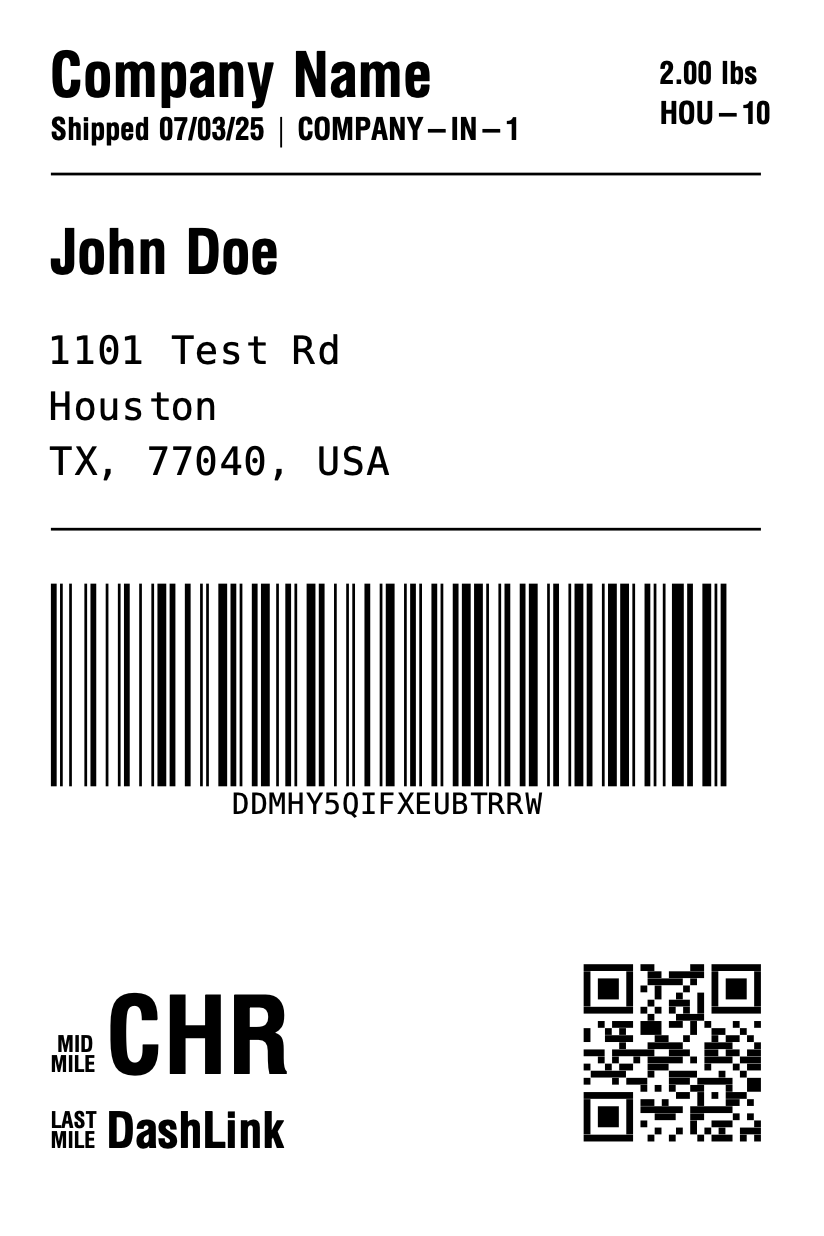
Sample Label (From PDF)

Page 39 of the PDF shows a full rendered DashLink label with:

  • Sender/recipient information
  • Routing blocks
  • Barcode
  • Tracking code