Order Cart Validation
Overview
Order Cart Validation (OCV) lets DoorDash validate a customer's cart against your system in real time, during checkout, before the order is submitted. It gives your system a chance to confirm the merchant can fulfill the order — and to tell the customer what to fix if the merchant cannot — while they are still in the cart and able to act.
OCV can catch problems that would otherwise become a cancellation after the order is placed, including:
- Out-of-stock or unavailable (86'd) items
- Price or subtotal discrepancies between DoorDash and your system
- Invalid modifiers or incomplete required selections
- Store closed, offline, or at capacity
If validation succeeds, the customer can place the order and DoorDash will transmit it to your system.
If validation fails, DoorDash blocks submission and displays a message on the checkout screen based on the validation failure reason you return.
The Problem OCV Solves
Today, a customer builds a cart, reaches checkout, places the order — and then the order is rejected at POS injection. Often that cancellation is preventable: an out-of-stock item, a missing required modifier, a store that just went offline. The result is an order cancellation, lost sales, and a poor experience for both the customer and the merchant.
OCV prevents these avoidable cancellations by validating the cart before submission. Why this matters:
- Fewer cancellations. Invalid orders are caught before they are placed, reducing POS-driven cancellations.
- Improved checkout experience. Customers receive real-time feedback on problematic carts and can resolve issues before placing the order, improving order conversion.
Real-world example
A case study conducted with a top DoorDash integration partner who implemented Order Cart Validation resulted in:
- 62.9% relative reduction in POS-driven cancellations.
- 11.5% relative reduction in orders with defects (orders that had a customer-visible issue like a cancellation, missing or incorrect items, lateness, or a customer complaint).
- 47% of carts that failed validation were eventually converted due to customer corrections.
How It Works
OCV is triggered when a customer proceeds from cart to checkout. The high-level flow:
- The customer builds a cart on the store page and taps Continue to move toward checkout.
- DoorDash invokes OCV by calling the validation endpoint with the full cart payload.
- The customer proceeds to the checkout page while validation processes in the background.
- When the customer taps Place Order:
- If validation succeeds, the order is submitted.
- If validation fails, the error is surfaced on the checkout page and submission is blocked.
- Depending on how actionable the error is, the customer either fixes the cart (and is re-validated) or is unable to proceed.
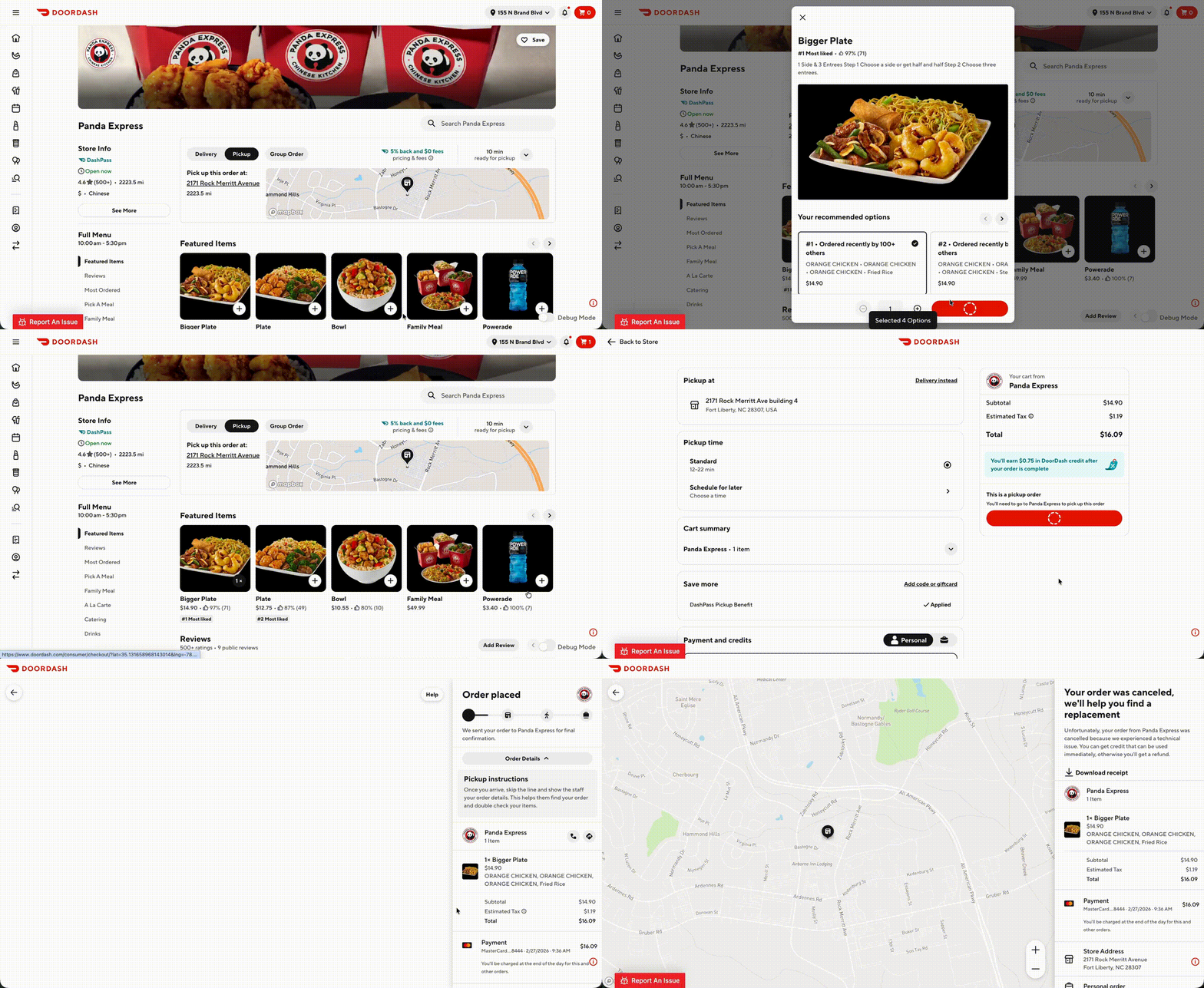
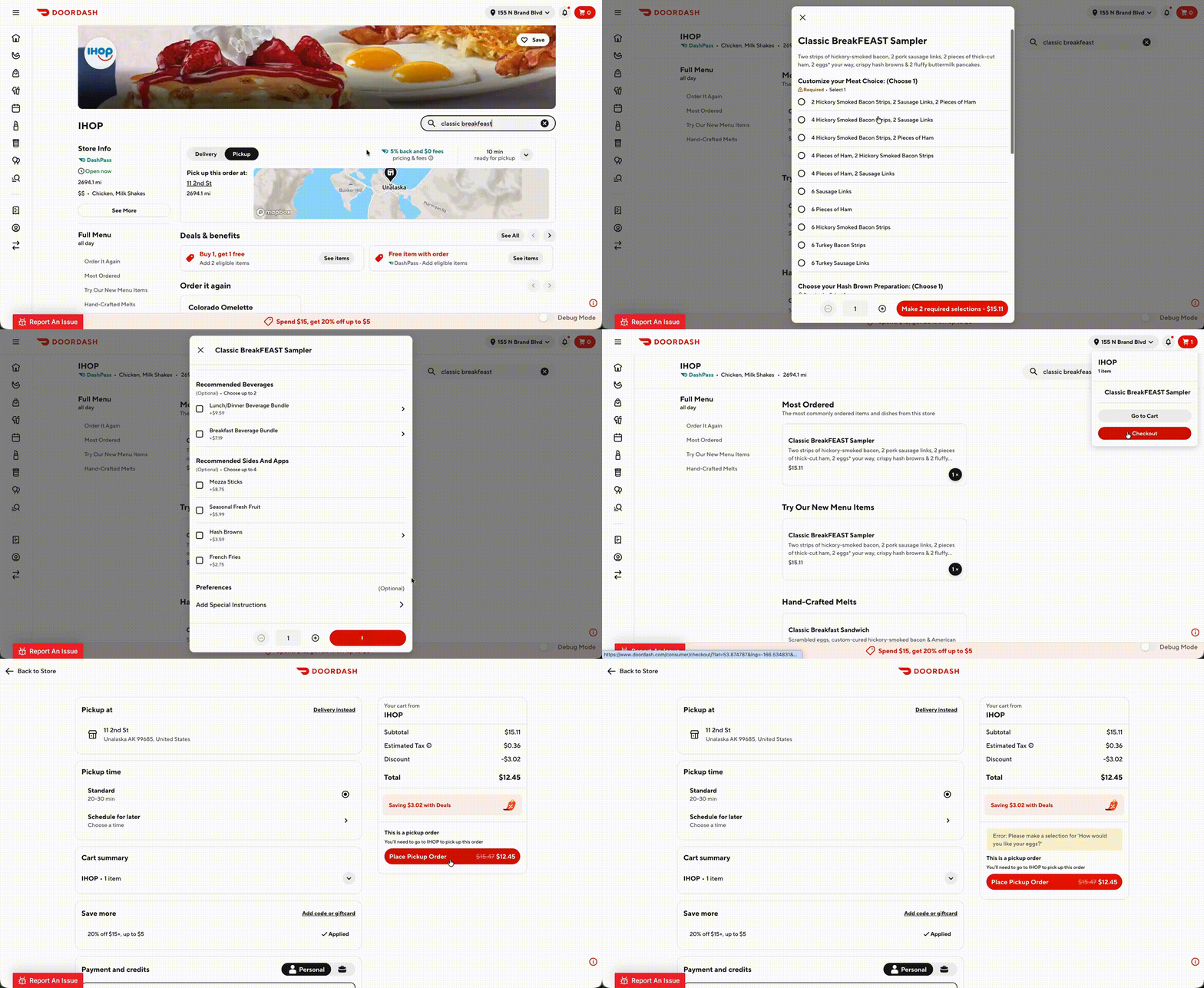
The difference is clearest side by side — the same checkout flow without OCV (the order is only rejected after the customer places it) and with OCV (the problem is caught in the cart, so the customer can fix it and still check out):
Without OCV
With OCV
What to Know
- The full cart is sent. Each validation request contains the complete cart (see the request payload below).
cart_idis the session identifier for the validation. - Editing the cart triggers re-validation. If the customer changes the cart contents, OCV runs again when they next attempt checkout.
- Order submission is unchanged. OCV is a separate pre-check; the existing order submission payload and flow are not modified.
Technical Requirements
How you implement OCV depends on where your integration sits relative to the merchant's point of sale (POS).
Direct POS integrations
If you are the POS (or integrate directly with it), you validate the cart against the POS itself — the source of truth for item availability, pricing, store hours, and capacity — and return the result.
Middleware / aggregator (MWP) integrations
If you are a middleware platform (MWP) sitting between DoorDash and one or more downstream POS systems, validation can happen at two layers:
- Middleware layer (Required) — your own view of menu pricing, item availability, capacity throttling, and store status.
- Downstream POS layer (Recommended) — validate against the downstream POS, the true source of truth.
Why downstream validation matters: the middleware's state is only as fresh as its last sync with the POS. In our analysis of item-availability cancellations, the large majority occurred at stores where the middleware layer had no recent availability update from the POS before the order — meaning a middleware-only check would have validated against stale data and let the order through. Validating at the POS layer closes this gap and materially reduces post-checkout cancellations.
Validation Scope
Once OCV is implemented, 100% of integrated orders must be validated through OCV. The specific validation checks vary by integration type, but the requirement to validate every order does not. Complete the applicable requirements below during cart validation.
For Direct POS integrations
| Validation / behavior | Certification requirement | When to implement |
|---|---|---|
| Item availability validation | Required | Always |
| Store availability validation | Required | Always |
Include the affected item ID in merchant_supplied_id or item name | Required | For item-related failures, such as out-of-stock items or invalid modifiers |
| Price discrepancy validation and modifier gap validation | Recommended | When order submission would reject the order for those reasons |
For Middleware / aggregator integrations
| Validation / behavior | Certification requirement | When to implement |
|---|---|---|
| Item availability validation against the middleware menu | Required | Always |
Include the affected item ID in merchant_supplied_id or item name | Required | For item-related failures, such as out-of-stock items or invalid modifiers |
| Item availability validation against the downstream POS | Recommended | When the downstream POS menu is the source of truth |
| Store availability validation against the downstream POS | Recommended | When the downstream POS would reject orders due to store-availability gaps |
| Price discrepancy validation and modifier gap validation | Recommended | When the downstream POS would reject the order for those reasons |
Endpoint Requirements
Partners must expose the following endpoint:
POST /orderCartValidation
Request Schema
Trigger: Fired automatically by DoorDash when the customer moves to the checkout page.
Headers: Standard signed headers as configured in your developer webhook subscription.
URL Parameters: None (cart_id and all cart data are passed in the request body payload).
Example Request
POST /orderCartValidation
{
  "cart_id": "string",     // Unique ID for this cart-validation session
  "store": {
    "merchant_supplied_id": "string", // Location ID
    "provider_type": "string"
  },
  "fulfillment": {
    "type": "dx_delivery",  // dx_delivery | pickup | mx_fleet_delivery
    "asap": true,           // true = ASAP, false = scheduled
    "requested_time": "2025-12-05T18:30:00Z"
  },
  "subtotal": 0.00,         // Pre-tax cart subtotal
  "tax": 0.00,              // Tax applied to the cart
  "categories": [
    {
      "name": "string",
      "merchant_supplied_id": "string",
      "items": [
        {
          "name": "string",
          "merchant_supplied_id": "string",
          "price": 0.00,
          "quantity": 0,
          "extras": [ /* modifier groups -> options, supports nesting */ ],
          "special_instructions": "string",
          "line_item_id": "string"       // Correlates this line to validation errors
        }
      ]
    }
  ],
  "experience": "DOORDASH"               // Ordering channel
}
Response Schema
You must return one of the following:
Success Response
{
  "valid": true,                                  // Cart validation successful
  "cart_id": "string",                            // Returned ID matching the request
  "expires_at": "2025-11-05T16:00:00Z",           // Time until validation expires
  "earliest_pickup_time": "2025-11-05T16:15:00Z"  // Earliest available pickup time slot
}
Failure Response
{
  "valid": false,                         // Cart validation failed
  "cart_id": "string",
  "expires_at": "2025-11-05T16:00:00Z",
  "errors": [                             // List of issue(s) found during validation
    {
      "code": "ITEM_OUT_OF_STOCK",        // Error from list of standardized error codes
      "merchant_supplied_id": "line_01",  // Item ID
      "message": "Cheeseburger is out of special item hours" // Message for further internal detail
    }
  ]
}
Response Rules
- The
cart_idmust match the request. - Use structured error codes (see below).
- Errors must be item-level when applicable.
- Do not return generic errors when a specific error applies.
- Only populate
errorswhenvalidisfalse. Do not send errors alongsidevalid: true— downstream logic can key off error presence and treat the order as failed even though it was marked valid. Usevalid: truewith an emptyerrorsarray for non-blocking conditions.
Error Codes
Partners must return one of the following standardized error codes. DoorDash maps each code to the customer-facing string shown at checkout.
| Error Code | Description | Customer-facing string |
|---|---|---|
| INVALID_ORDER | Cart structure is invalid or incomplete. | There's an issue with your {item}. Please update or remove it and try again. |
| ITEM_OUT_OF_STOCK | Item is unavailable (86'd) at the restaurant. | This {item} is currently unavailable. Please remove or update this item and try again. |
| STORE_HOURS_ISSUE | Order placed outside of configured POS store hours. | We're having issues accepting orders at this time. Please try again later. |
| INTERNAL_ERROR | Unexpected system failure. | We ran into an unexpected issue. You can try again. |
| OTHER | Unclassified error. | We're having issues accepting orders at this time. Please try again later. |
| CONNECTIVITY_ISSUE | Network/POS transmission issue. | We were unable to reach the store. Please try again. |
| TIME_OUT | Validation timed out. | We were unable to reach the store. Please try again. |
| STORE_CLOSED | The store is closed or not accepting orders. | This store is currently closed. You can try again later or select a different store. |
| STORE_CLOSED_EARLY | Restaurant closed or not accepting orders. | This store is currently closed. You can try again later or select a different store. |
| POS_OFFLINE | The restaurant cannot be reached due to the POS being offline or otherwise unavailable. | This store is currently unavailable. You can try again later or select a different store. |
| CAPACITY_THROTTLING | Kitchen capacity limit reached. | The store is busier than usual and is unable to take orders at this time. You can try again in a few minutes. |
| STALE_PICKUP_TIME | The selected time is no longer valid. | Your selected pickup/delivery time is no longer available. You can choose a new time and try again. |
| ORDER_ONLINE_DISABLED | The store has online ordering disabled. | This restaurant is not accepting online orders at this time. |
| INVALID_ADDRESS | Address is invalid. | This address is invalid. Please update your delivery address. |
| STORE_RENOVATION | The store is unavailable due to renovation. | This restaurant temporarily paused online orders. You can try again later or select a different store. |
| STORE_TEMP_CLOSED | The store is temporarily closed. | This restaurant temporarily paused online orders. You can try again later or select a different store. |
| WEATHER_ISSUES | Orders paused due to external conditions. | Orders are currently paused due to local conditions. You can try again later or select a different store. |
| NO_SLOTS_AVAILABLE | There are no open fulfillment time slots at this location. | Your order cannot be completed today. Please schedule your order for a future date to proceed. |
| REQUESTED_SLOT_UNAVAILABLE | The wanted fulfillment time is unavailable at this location. | The store is busy and your order will arrive later than originally estimated. |
| PROMO_CONFIG_ISSUE | The POS rejected the promotion ID on the order payload. | The promotion on this order is not valid at this time. Please try again without or with a different promotion. |
Field details
Top-Level Fields
| Field | Description |
|---|---|
| cart_id (Required) | Unique identifier for tracking this cart validation session. |
| store.merchant_supplied_id (Required) | Your internal store/location identifier. |
| store.provider_type | POS integration type being used. |
| fulfillment (Required) | Fulfillment method. Enum: dx_delivery, pickup, mx_fleet_delivery. |
| asap (Required) | Boolean. true for ASAP orders; false for scheduled orders. |
| requested_time | Timestamp of requested fulfillment time. |
| subtotal | Pre-tax cart subtotal (decimal). |
| tax | Tax amount applied to the cart (decimal). |
| categories (Required) | Structured array of menu categories containing ordered items. |
| experience | Ordering channel. Value: DOORDASH. |
categories[] — Category Object
| Field | Description |
|---|---|
| name | Category display name (e.g., "Burgers", "Sides"). |
| merchant_supplied_id | Your internal identifier for this menu category. |
| items (Required) | Array of item objects ordered within this category. |
categories[].items[] — Item Object
| Field | Description |
|---|---|
| name | Display name of the menu item. |
| merchant_supplied_id (Required) | Your internal POS identifier for this item. |
| price | Unit price of the item (decimal). |
| quantity (Required) | Quantity of this item requested by the customer. |
| extras | Array of modifier/add-on group objects. |
| special_instructions | Optional free-text notes from the customer for this item. |
| line_item_id (Required) | Unique identifier for this line item, used to correlate validation errors back to the item. |
items[].extras[] — Modifier Group Object
| Field | Description |
|---|---|
| name | Display name of the modifier group. |
| merchant_supplied_id | Your internal identifier for this modifier group. |
| options | Array of the modifier options selected by the customer. |
extras[].options[] — Modifier Option Object
| Field | Description |
|---|---|
| name | Display name of the modifier option. |
| merchant_supplied_id | Your internal identifier for this modifier option. |
| price | Price adjustment for this modifier option (decimal). |
| quantity | Quantity of this modifier option selected. |
| extras | Supports further nesting for complex modifiers. |
| line_option_id | Unique identifier for this specific modifier option selection. |
Field Summary — Response
Your endpoint must return one of the following response structures. All responses must include cart_id matching the request.
Success Response Fields
| Field | Description |
|---|---|
| valid (Required) | Boolean. Must be true to indicate the cart passed validation. |
| cart_id (Required) | Must match the cart_id from the request exactly. |
| expires_at (Required) | Timestamp indicating when this validation result expires. |
| earliest_pickup_time | Earliest available pickup time slot. |
Failure Response Fields
| Field | Description |
|---|---|
| valid (Required) | Boolean. Must be false to indicate validation failed. |
| cart_id (Required) | Must match the cart_id from the request exactly. |
| expires_at (Required) | Timestamp indicating when this validation result expires. |
| errors (Required) | Array of error objects detailing all issues found. See error object fields below. |
errors[] — Error Object Fields
| Field | Description |
|---|---|
| code (Required) | Standardized error code string. Must be one of the defined error codes (see Error Codes section). This is used to determine the customer-facing error message. |
| merchant_supplied_id (Required) | The ID of the specific item or entity associated with this error. This is used to map the problematic item in the customer-facing error response. |
| message (Optional) | An optional message for further internal detail on the error. |
Latency & Timeout Behavior
- If the partner does not return an OCV response by the time the customer attempts to place an order, validation will be bypassed and the order will be submitted. This is considered an OCV timeout.
- Excessive OCV timeouts may result in OCV being disabled for affected stores.
Stale Cart Revalidation
DoorDash will automatically re-run OCV for a cart that sits idle on checkout for an extended period, in order to catch store/menu data drift before the order is submitted.
- Behavior: if a cart remains idle for more than 5 minutes, DoorDash re-validates using the same
cart_id, up to a maximum of 3 re-validation attempts per cart session. - As such, ensure that rate limits for the OCV endpoint can support multiple API calls for the same cart.
Testing & Certification
Before production launch:
- Implement the required cart-validation capabilities outlined in the Technical Requirements section.
- Configure and test your integration in the sandbox environment.
- Validate required scenarios and confirm that your integration returns the appropriate responses.
- Share test results with your DoorDash Technical Account Manager.
- Once all requirements are met, coordinate with your Technical Account Manager to complete certification and plan launch.
Contact your DoorDash Technical Account Manager to begin certification.
FAQ
Q: What happens if my endpoint doesn't respond in time?
A: If no response is received before the customer places the order, validation is bypassed and the order is submitted as-is. Repeated timeouts may result in OCV being disabled for the affected stores.
Q: Do I need to return every applicable error, or just one?
A: Return all applicable errors as a list. Don't return a generic error when a specific one applies, and errors should be item-level whenever possible.
Q: How do I begin certification?
A: Contact your Technical Account Manager to begin the certification process.
Q: If a cart is valid but I want to flag a non-blocking issue (e.g., a tax mismatch), should I still populate errors?
A: No, only populate errors when valid is false. Sending errors alongside valid: true is risky: DoorDash's downstream logic can key off error presence and treat the order as failed even though it was marked valid. Use valid: true with an empty errors array for non-blocking conditions.
Q: Can the same cart_id be validated multiple times (e.g., customer edits cart)?
A: If the customer edits the contents of the cart, that will not change the cart_id (unless they remove all items and start again, or create a cart for another store). So yes, the same cart_id can be sent in multiple validations. DoorDash's subsequent OCV call would reference the same cart_id and would reflect the entire updated cart.