DoorDash's integration onboarding assistant
WHAT
DoorDash's assistant helps merchants complete SSIO (self-serve integration onboarding) setup automatically without leaving DoorDash - the merchant opts in from their Merchant Portal, and the assistant handles the POS portal setup in the background with explicit merchant consent up-front.
The assistant executes specific defined steps required to complete SSIO within existing POS provider portals, while the merchant tracks progress entirely within DoorDash.
This is the first in a broader set of AI-assisted workflows DoorDash is building for integrated merchants. As the capability expands, it will extend to additional support use cases including menu updates and store configuration. DoorDash will notify providers in advance of any expansion beyond the initial use cases outlined in this document.
DoorDash plans to roll out this capability to merchants with a gradual rollout starting in October.
WHY
Today, 50-70% of common DoorDash operational issues for integrated merchants require actions that must be completed outside of DoorDash, typically in POS portals or middleware systems. While DoorDash can often detect what needs to be fixed, these actions typically must be completed directly by merchants in POS portals, resulting in manual workflows and repeated coordination across DoorDash and POS provider support teams.
These issues drive avoidable support volume, repeated escalations, and misconfigurations across both DoorDash and POS provider teams, despite being deterministic and repeatable in nature, leading to:
- Many merchants are not able to complete SSIO within 1 day, driven by lack of knowledge despite help articles and step-by-step instructions
- 5–7+ day average resolution times, driven by slow, manual workflows and repeated back-and-forth between DoorDash, POS providers, and merchants
- #1 reported pain point for integrated merchants: high confusion and frustration when POS and DoorDash states don't align, especially around menu synchronization
- Multiple support interactions for simple, repeatable tasks, increasing total case volume and operational overhead across both partners
- ~20% of cases redirect merchants back to their POS provider, despite the existence of help articles and step-by-step chat instructions
The assistant addresses the onboarding piece of this directly – making the agent-assisted experience available 24/7 and automatically, with reduced merchant wait time. As we expand to additional support workflows, it will address the broader friction points by turning identified issues into actionable, guided experiences, reducing repeated escalations, back-and-forth, and overall support volume across both DoorDash and provider teams.
Merchant demand for more hands-on support is strong: in a related pilot, 83% of merchants opted in when white glove support was offered for DoorDash to walk merchants through the POS portal troubleshooting step by step.WHO
DoorDash will lead this initiative on behalf of merchants, working with POS and other middleware providers in partnership on the limited use cases outlined below. No development work is required on the POS or middleware platform side. DoorDash's assistant will be enabled for shared merchants by default. Please raise questions or concerns via Developer Portal Support before October.
HOW IT WORKS
The assistant is designed to work within existing POS provider experiences, without changing how providers manage permissions, authentication, or merchant configurations. Importantly, the merchant experience is entirely within DoorDash - merchants complete onboarding on the DoorDash Activation Tracker as POS-side actions happen automatically in the background.
If the assistant encounters an error it cannot resolve, it stops immediately and offers the merchant the option to schedule a call with a POS Support agent.
Note: The assistant is designed to minimize data access. DoorDash does not store or retain merchant login credentials.
TARGET EXPERIENCE
SSIO onboarding
- During DoorDash onboarding, the merchant sees an option to save setup time on their Activation Tracker by using assistant to set up their POS integration with DoorDash
- The merchant grants permission for the assistant to proceed
- The assistant handles the POS portal setup automatically in the background – the merchant tracks progress on their Activation Tracker without leaving DoorDash
- The merchant handles three steps directly: signing into their DoorDash account, signing into their POS account, and manually agreeing to T&Cs via a webview. The assistant completes the remaining setup steps.
- Once complete, the merchant sees their integration marked as complete on the Activation Tracker
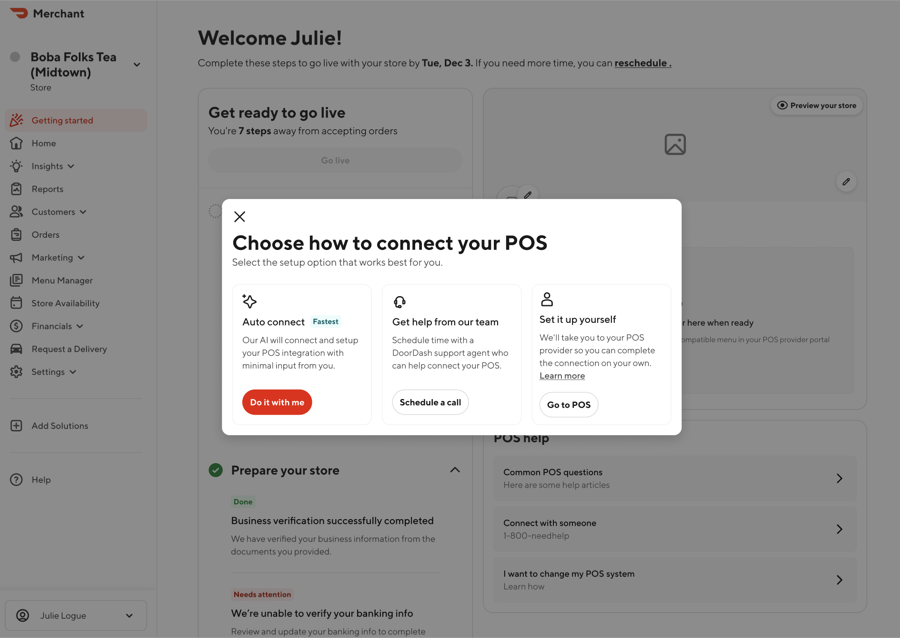
The assistant is available 24/7. If a merchant is not comfortable using it, they will always have at least one alternative option to complete their integration.
Selecting "Do it with me" brings merchants to the SSIO onboarding experience.
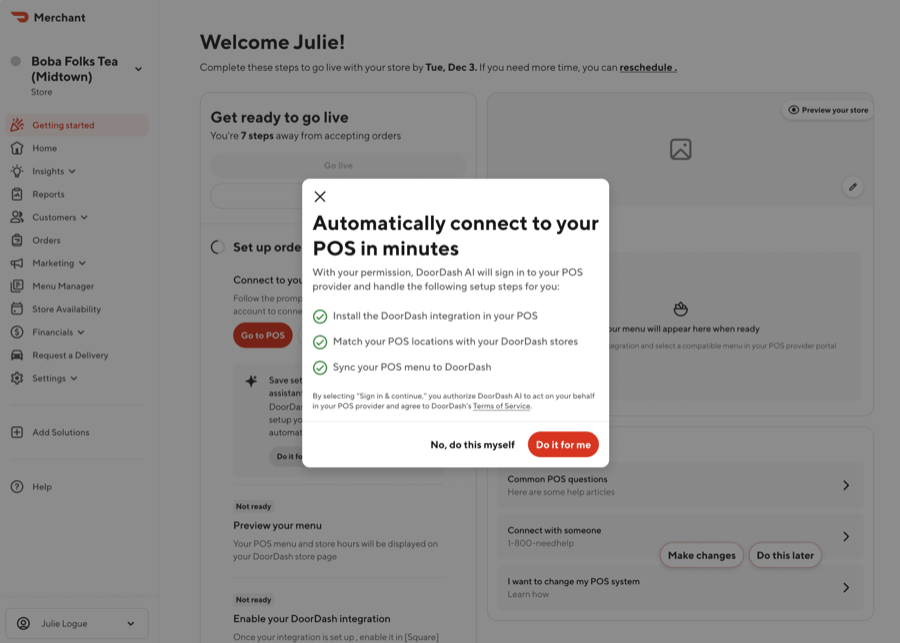
Clicking "Get started" takes merchants through the process, starting with their POS login.
Potential future use cases:
- Price updates: DoorDash guides merchants to their POS portal, updates the price with merchant confirmation before saving, then triggers a menu update to reflect changes on DoorDash.
- Item Name/Description Updates: DoorDash guides merchants to their POS portal, updates the item name or description with merchant confirmation before saving, then triggers a menu update to reflect changes on DoorDash.
- Store Hours Updates: DoorDash confirms whether the integration supports integrated hours, then takes action in DoorDash, the merchant portal, or the POS portal as appropriate.
The goal is to reduce merchant and partner operational burden by guiding merchants through actions that already must occur in POS portals—more accurately, efficiently, and with fewer support touchpoints. All POS portal related actions will remain strictly limited to the use cases listed in this document and will not expand beyond these actions unless providers are notified in advance of any changes or expansion.
FAQs
Where does this experience originate? Does the provider need to initiate anything?
The experience is initiated from the DoorDash side. No provider-side initiation or workflow changes are required.
Does this require any development work from providers?
No. The assistant works within existing provider portals and workflows. DoorDash owns the end-to-end development and maintenance.
Will the AI take actions without merchant consent?
No. All actions require merchant consent. The assistant guides and executes defined steps only after the merchant has approved the flow, and merchants can stop the process at any point.
Will merchant permissions and actions be tracked?
Yes. DoorDash maintains a full log of all actions, including merchant consent, the action taken, agent reasoning, and the outcome (success/failure, total duration). These logs can be shared if needed. DoorDash will not retain any data beyond these action logs.
How does the AI interact with access and permissions frameworks?
The assistant is designed to fully operate within existing provider permission models. All actions are performed with merchant-granted access and consent, within the provider's own portal environment. DoorDash does not bypass authentication or take actions outside what the merchant is authorized to do. Merchants input their own account credentials and these are never stored by DoorDash.
How is PII handled?
The assistant is designed to minimize data access. DoorDash does not store or retain merchant login credentials or persist access to provider systems. All actions occur within existing authenticated sessions.
How does the AI know what actions to take within provider portals?
The assistant is trained on existing provider documentation, workflows, and enablement materials. It executes only well-understood, deterministic actions that mirror how merchants complete these tasks today.
What types of issues does this address today?
Initial scope is intentionally narrow and focused on SSIO onboarding – to improve the onboarding experience for integrated merchants at activation. Menu updates and store configuration will follow as the capability expands.
What are the most common issues for our shared merchants?
Across integrated merchants, the highest volume issues are:
- Menu mismatches and sync issues (#1)
- Store configuration / offline troubleshooting (#2)
- Order-level issues including cancellations (#3)
The assistant is designed to address these systematically over time.
What impact should providers expect?
Today, 50–70% of common operational issues require action outside of DoorDash, often resulting in back-and-forth between DoorDash, providers, and merchants. The assistant reduces this by resolving issues in a single guided flow, reducing shared support volume, repeat contacts, and escalations across both DoorDash and provider teams.
In a similar white-glove pilot:
- 83% of merchants opted into additional guided support when offered
- Resolution times improved from days → same-session completion
- Reduced repeat contacts and escalations across both DoorDash and provider teams
How do we know this is something merchants actually want?
Merchant feedback in a similar pilot was consistently strong:
"Thank you for being so diligent regarding our account. We are up and running! I am so grateful."
Merchants frequently requested follow-up support and expressed frustration with the current model of being redirected between DoorDash and providers. The assistant directly addresses this gap by owning onboarding end-to-end.
How do we measure success?
Success is defined by:
- Resolution time reduction (days → minutes)
- Fewer provider escalations
- Lower shared ticket volume
- Reduced repeat contacts
- Improved merchant satisfaction
What is the long-term vision vs. MVP?
MVP is intentionally scoped to SSIO onboarding to validate safety and impact. This is the first in a broader set of AI-assisted workflows DoorDash is building for integrated merchants - expanding over time to cover menu, store, and additional support use cases. Providers will be notified ahead of any expansion.
How should I engage if we would like to raise any questions/concerns?
The assistant will be rolling out to all shared merchants. Please reach out via Developer Portal Support if you would like to discuss any of the listed use cases further prior to a gradual rollout starting in October.